DEVELOPMENT SNAPSHOT #94 — Who Leads and How Strong: The Regiment Window Rebuilt
Contributed by: Takeshi Miyaoka on Wednesday, November 11 2026
Last modified on Wednesday, November 11 2026
I rebuilt the regiment window and the platoon deployment window. Until now, appointments, equipment and deployment were scattered in small pieces across several windows. The two windows now split the work: the regiment window answers who leads and how strong the unit is (personnel and strength), and the platoon deployment window answers what the platoons carry and where they go (supplies). Each value can be changed in only one of the two; the other shows a summary and a shortcut ("Equipment: Platoon Deployment ›" and "Personnel: Regiment ›").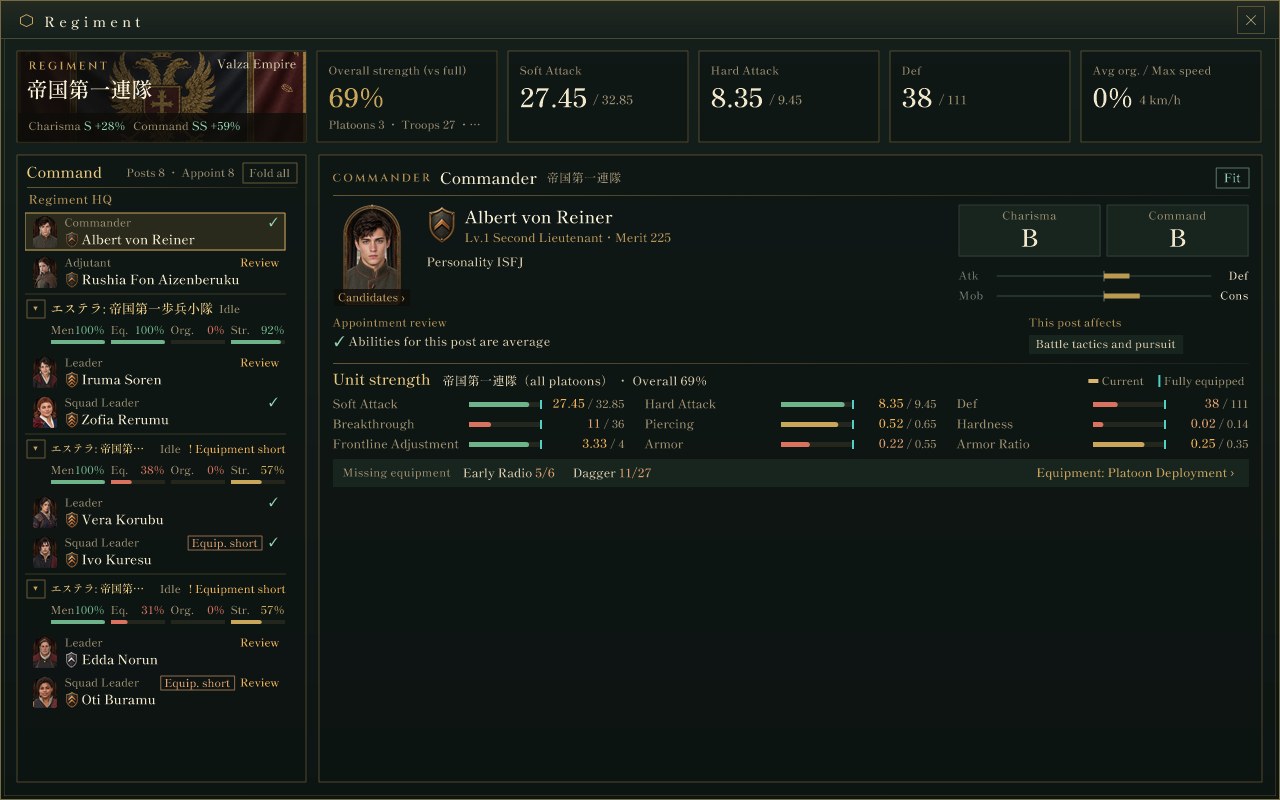
The new regiment window (an actual screen from the Debug build). The Command column on the left lists the regiment HQ and each platoon's posts; the right side shows the selected post (here the commander): the person, the appointment review and the unit's strength.
Top row: the regiment name and a strength summaryThe top row shows the regiment name on a band of the national flag (editable in place; long names are drawn in a smaller font to fit) and the bonus that applies when both a commander and an adjutant are appointed. Next to it are the regiment's overall strength, soft attack, hard attack, defense, average organization and maximum speed.
Overall strength takes "current value ÷ fully equipped value" for soft attack, hard attack and defense and averages the three as a percentage. It is a display-only value that shows at a glance how well the regiment is equipped; the game's calculations do not use it.
Left column: the command structureThe left column lists the regiment HQ (commander and adjutant) and, for each platoon, the platoon leader and the squad leaders (squads 1 to 3, air and support). Each platoon heading shows its state, warnings and bars for troops, equipment, organization and strength, colored by 80% and above, 50 to 79%, and below 50%. Platoons can be folded one by one, or all at once with "Fold all".
Each post row shows a portrait, rank insignia, name and an appointment mark (✓, ! or Review). Squads that lack troops or equipment get an "Equip. short" tag. The logistics squad has no squad leader, so it does not appear in the command structure.
Right column: post details and candidatesSelecting a post shows the person's portrait, rank, level, merit and personality, the grades of the abilities that matter for the post, their tilt, the appointment review, what the post affects, and the unit's strength. The abilities are charisma and command for the commander and adjutant, and command for platoon and squad leaders, shown only as grades from S to E (SS at 100 or more). Commanders and leaders also show their tilt between attack and defense and between mobility and conservation; the adjutant shows the bonus given to the commander.
Unit strength lists current and fully equipped values for the whole regiment (commander and adjutant), the platoon (platoon leader) or the squad (squad leader). Missing equipment is only summarized here; the details are left to the platoon deployment window.
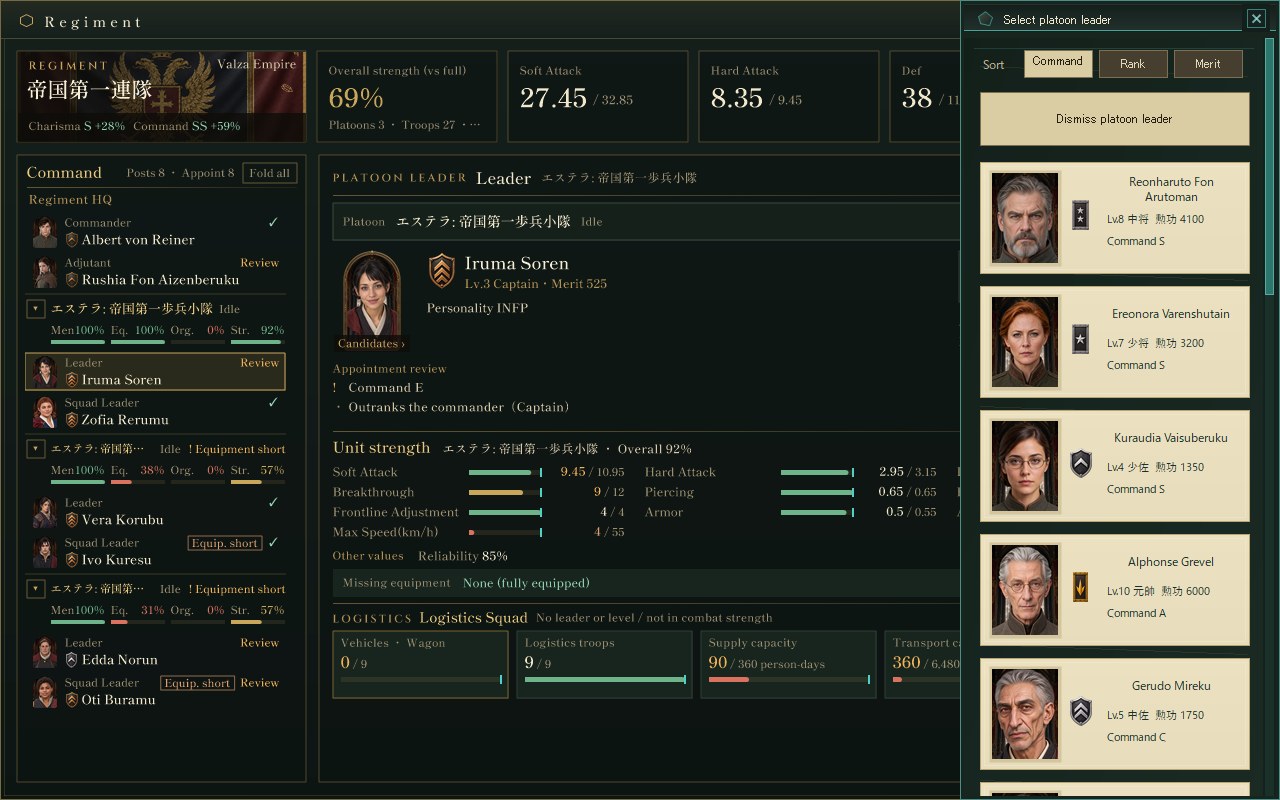
A platoon leader selected with the candidate panel open (an actual screen from the Debug build). The platoon band and "Set Headquarters" sit at the top of the right column, and the logistics squad cards below. In the panel that slides in from the right, the first row dismisses the current holder, followed by the sort buttons and the candidate cards.
When a platoon leader is selected, the top of the right column shows the platoon band with "Set Headquarters / Unset Headquarters" (headquarters are set per platoon), and a logistics squad section appears below the strength table. The logistics squad is shown as cards for vehicles, logistics troops, supply capacity, transport capacity and move speed; the move speed is the transport capacity divided by the supply capacity.
The appointment review is derived from the ability grades and the direction of the tilt, the combination of personality and local supply set to "Requisition: leader decides", and whether the person holds another post; the "Fit" and "Review" tags come only from this value. Clicking the portrait (or the "Appoint" frame for a vacant post) opens the candidate panel, with sort orders per post (commander: charisma, command, rank; adjutant: bonus, rank, merit; platoon and squad leaders: command, rank, merit). Clicking a card appoints that person at once. As before, candidates are people of the country who hold no post and are not squad leaders in this regiment.
The platoon deployment window: supplies onlyThe platoon deployment window was rebuilt around supplies. The top row summarizes deployed platoons, troops, equipment fill, shortages, items in transit and platoons waiting for equipment. On the left are strength by destination and new deployment reservations; in the middle, a list of all platoons and the missing equipment (with equipment images); on the right, the selected platoon's deployment priority, supply priority, local supply, formation cost, and equipment allocation with its reason. The allocation comes from the decisions of the daily allocation process. The leader field shows only the name and points to the regiment window for personnel. Forced deployment and disbanding are also done from the right section.
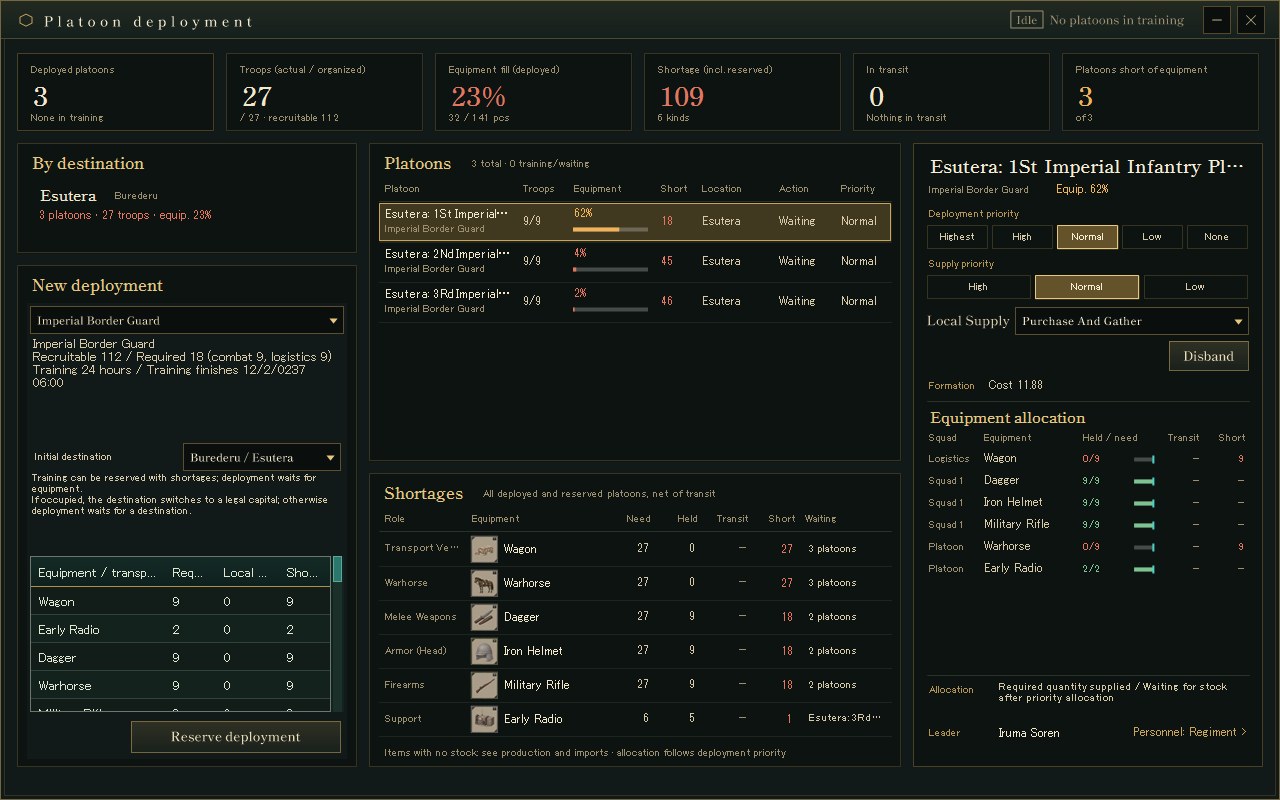
The platoon deployment window (an actual screen from the Debug build). Missing equipment is listed with images: what is short, by how much, and which platoons are waiting. "Personnel: Regiment ›" at the bottom right leads back to the regiment window.
What we checked, and what remainsWe launched the updated Debug build without showing it on screen and captured each post (commander, adjutant, platoon leader, squad leader), the open candidate panel, the folded command structure and the platoon deployment window in both Japanese and English. Clipping and overlaps found during capture (the bonus text overlapping the flag's emblem, strength labels, the adjutant bonus and sort buttons cut off in English, and headings and columns in the deployment window) were fixed before merging, and the regression checklist was updated for the new windows.
In English, some text still appears in Japanese, such as regiment and platoon names and the rank and merit labels on candidate cards; the images show this as it is.
About the imagesAll images are cropped from actual game screens of the updated Debug build, launched off screen in a verification state started from the initial master. Because this is right after the start, organization is still 0% and the platoons are waiting. People, regiment names and numbers come from the test state and may change with later tuning.
The previous regiment article: DEVELOPMENT SNAPSHOT #76 — Appoint from the Platoon Window: Candidates Shown by What the Post Needs
Previous article: DEVELOPMENT PLAN #93 — Rivers Rise, Springs Run Dry: Water Sources That Remember the Weather
Check the files currently available and the development status on the download page