DEVELOPMENT SNAPSHOT #104 — Facilities at a Nationwide Glance: One List, Queue Cards, Named Houses
Contributed by: Takeshi Miyaoka on Monday, November 16 2026
Last modified on Monday, November 16 2026
I rebuilt the construction window as a new Facilities screen. The old window showed facilities one region at a time, so finding out how many water intakes the whole country had, or where workers were short, meant opening region after region. Facility details were split across Basic, Details, Build, Remove and Management tabs, and the construction queue was a one-line list reordered with up and down buttons. Working from an improvement mock-up the user approved, I implemented the new screen in three steps.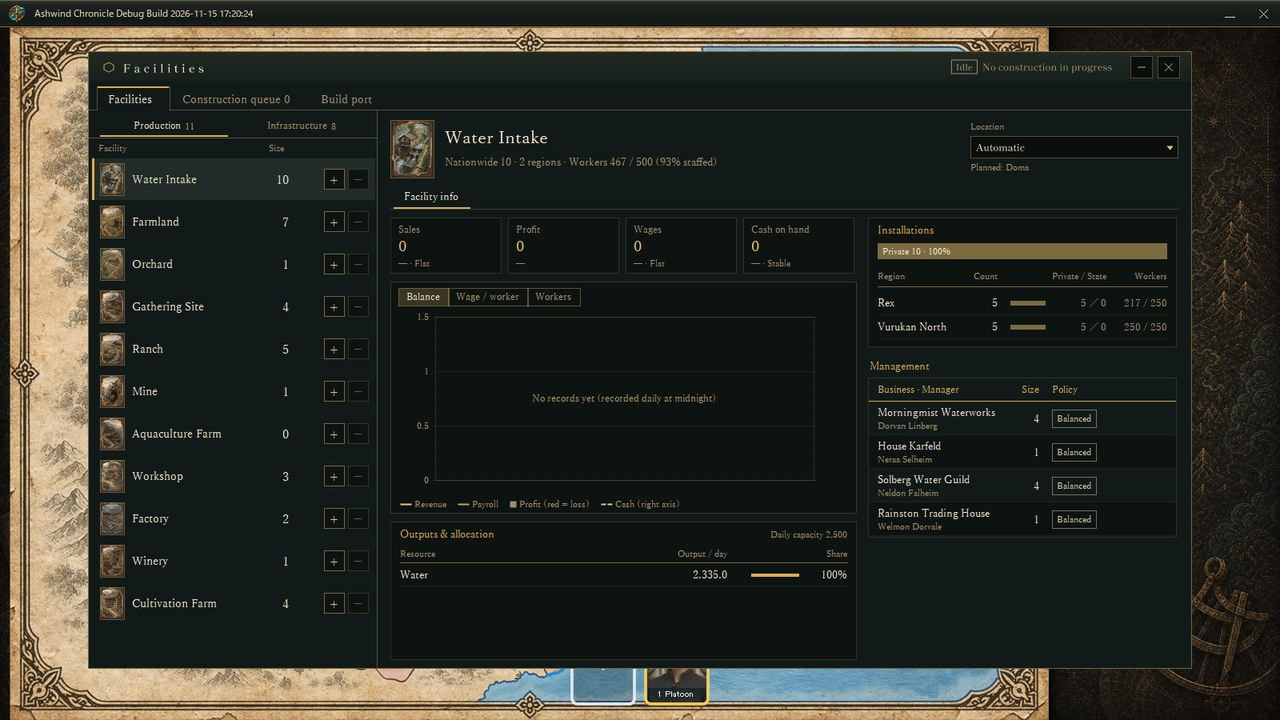
Water Intake selected in the facility list (an actual screen from the Debug build). The left side shows nationwide counts; the right side puts the stat panels, a daily chart, outputs, installations and management on a single page.
1. One nationwide facility listThe window is now called Facilities, measures 1380×772 and uses the same serif typeface as the other screens. Its tabs are Facilities, Construction queue and Build port, in that order.
The list no longer switches between regions; it shows the nationwide count, private and state combined. Facilities are split into Production and Infrastructure, and problems such as worker shortages appear as badges under the facility name. The + and − buttons on each row reserve building or removing one facility at a time, and the reserved change shows next to the count as +1 or −1. The Location box at the top right decides where: Automatic picks the province with the fewest of that facility nationwide, or you can name a province.
2. Facility info on one pageThe header of the selected facility shows the nationwide count, the number of regions and workers with the staffing rate. Below it, four stat panels show sales, profit (with the margin), wages and cash on hand, in the same panel style as other screens; the colour and wording of the line underneath (Flat, Stable and so on) tell you whether things are going well. The chart drops the day/week/month switch and shows daily values only, keeping the Balance, Wage per worker and Workers views. On the right, Installations shows the count per region, the private/state split and workers, and Management lists each business with its size and policy.
Controls specific to a facility, such as warehouse capacity allocation, now live in an Operating orders tab. Warehouses get a per-region table for scheduling the split between resources and equipment; schools, banks, checkpoints, docks, air defense and the like let you pick a region and show its current orders. Exploration bases hold ruin exploration and document analysis, and ruin excavation for floating stones, the idea from evening post #91, was implemented as an order placed from here as well.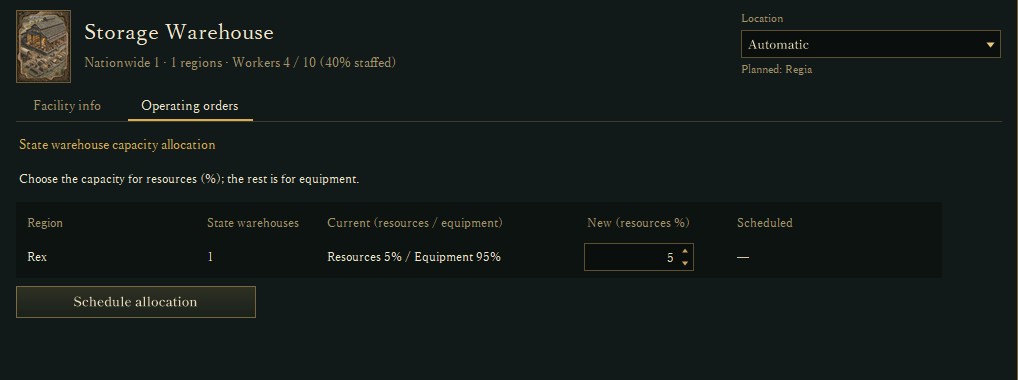
Operating orders for the Storage Warehouse: choose the share of capacity used for resources in each region and schedule the change (the rest goes to equipment).
3. A construction queue made of cardsEach entry in the construction queue is now a card with the facility image, name, build or remove, status, progress, days left and workshops. Drag the handle on the left to change the order; workshops are assigned from the top of the queue. Before work starts, you can pick a different province from the card's Location box, and the details on the right let you change the number of requested workshops with + and −.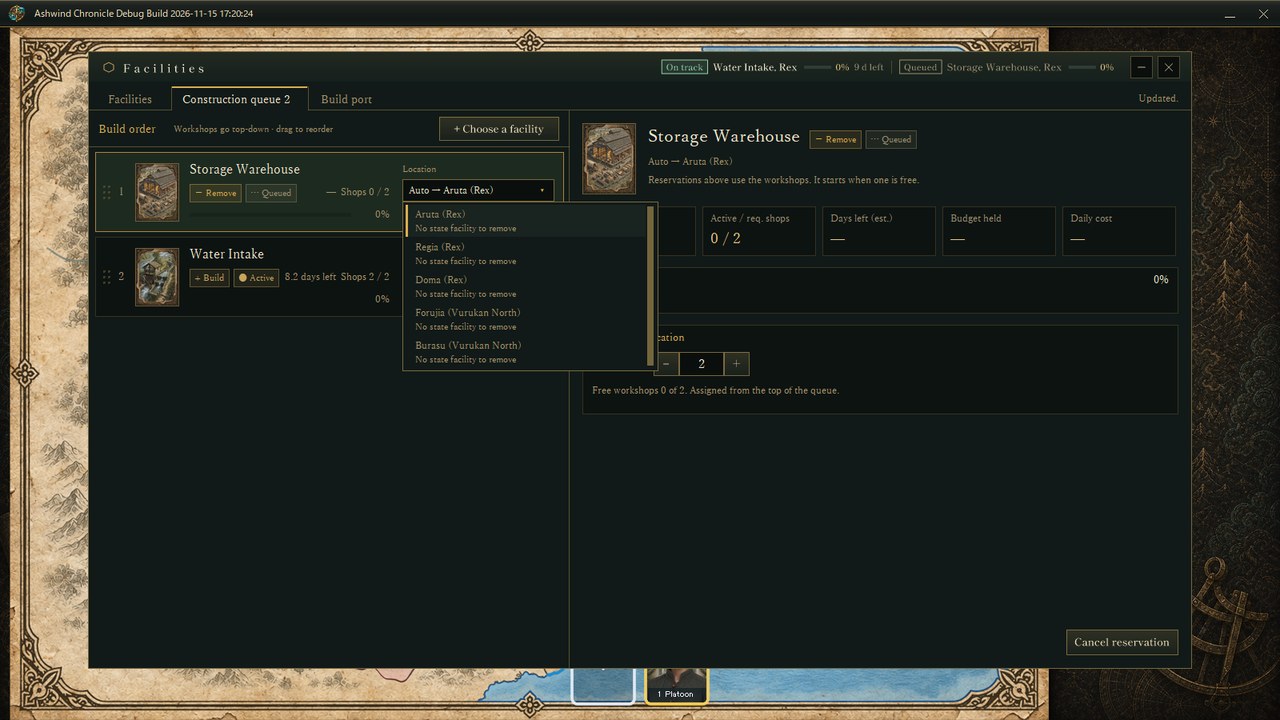
Two queue cards, with the location list open on the Storage Warehouse removal. Provinces without a state facility to remove say so.
4. Named merchant houses and familiesPrivate businesses used to show only a manager's name, so you never saw who owned them. I added a Japanese/English list of names (90 trading houses, 60 families and 178 facility-specific names, 328 in all) and each business owner now receives a unique name that is recorded in the save. About half the owners get a facility-specific name such as Morningmist Waterworks or Solberg Water Guild; the rest get house names such as Rainston Trading House or House Karfeld. The name follows from the owner's ID, so the same save always produces the same names. A new owner gets a new name, and if the list runs out the manager's name is shown instead. In the Management panel the manager now appears under the business name (bottom right of image 1).
What I checkedEach step went into main only after checking actual Debug-build screens in Japanese and English (the list, + reservations, operating orders, the queue, dragging, location choice and the house names) and the related automated tests. Six tests were added for name assignment, and all 111 related tests for step 3 passed. A later fix removed a horizontal scrollbar that appeared in the right column for facilities without businesses. The improvement item is now complete.
About the imagesAll images are actual game screens, captured on November 15 by starting the Debug build without showing its window in a verification state started from the initial master data (image 2 is a crop of the facility info area). Because the state is right at the start, the chart has no records yet and panels such as sales read 0. Nation, place and business names belong to the verification state.
An earlier construction post: Ashwind Chronicle Developer Blog #15 — Construction Categories
The excavation idea: DEVELOPMENT PLAN #91 — Digging Floating Stones from Ruins: The Finite Relics Behind Every Airship
Check the files currently available and the development status on the download page