DEVELOPMENT SNAPSHOT #122 — Government Offices Show the Tax They Miss
Contributed by: Takeshi Miyaoka on Wednesday, November 25 2026
Last modified on Wednesday, November 25 2026
A Government Office collects taxes, but its facility screen used to show the same sales and profit chart as every other facility, so you could not tell how much of the full tax was actually collected and how much slipped away. On November 23 and 24 the Government Office screen was rebuilt with a Tax collection chart, a breakdown by region and a staff limit for each office (improvement items UI-092 and ECO-010).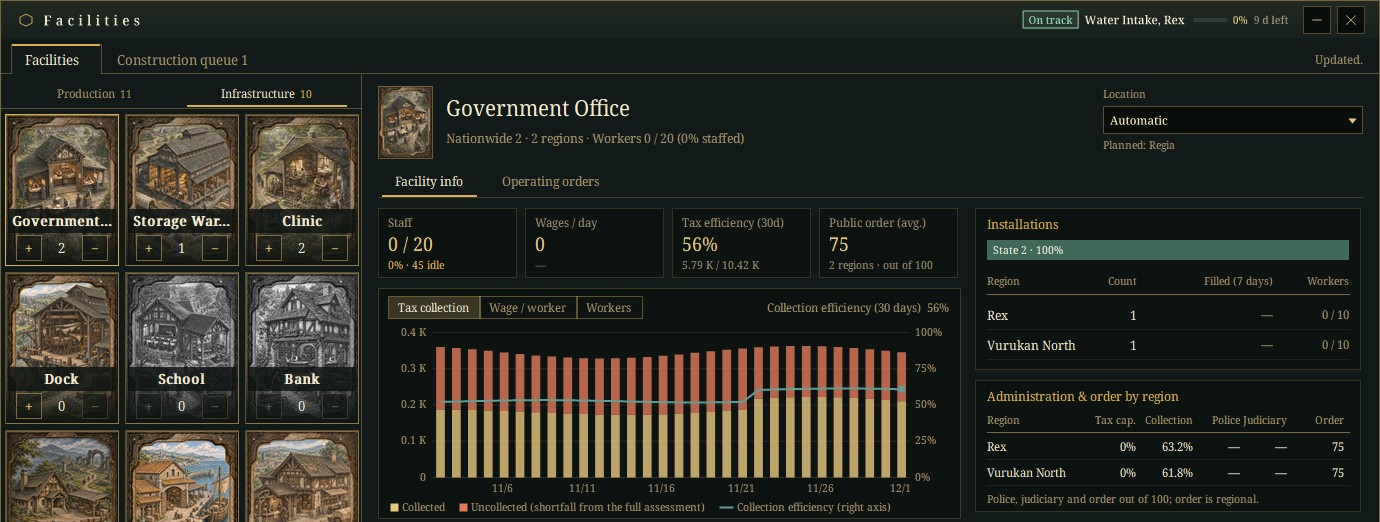
Facility info for the Government Office (an actual Debug-build screen from main on November 24). The top cards show staff, wages, tax efficiency (30 days) and public order; the chart in the middle is the new Tax collection tab; on the right are Installations and Administration & order by region.
1. The tax chart: each bar is the full assessmentThe first tab of the chart is now Tax collection. Each day's bar stacks what was collected (gold) on top of what was not (red), so the height of the bar is the full assessment. The line is collection efficiency (collected ÷ full assessment), read on the right axis from 0 to 100%, and the 30-day efficiency is shown at the top right.
The chart reads the country's tax settlement records (kept for 30 days) for the taxes that collection efficiency applies to: the poll tax and the income tax. The full assessment is the annual assessment ÷ 365, the uncollected amount is the annual uncollected amount ÷ 365, and the collected amount is the difference, before collection costs. Losses to the shadow economy and the gross production tax are not included. The screen only reads the records; it never rewrites them.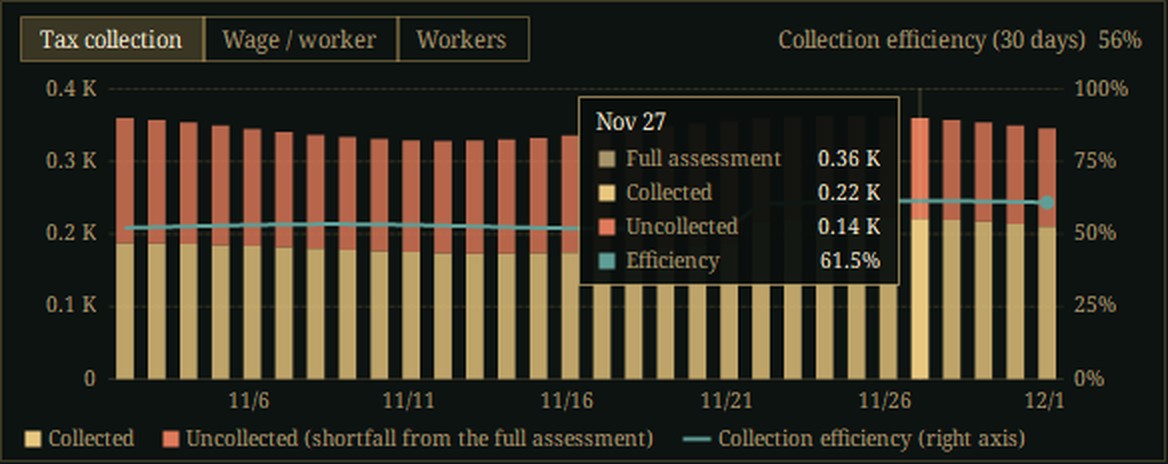
Hovering over a bar shows that day's full assessment, collected and uncollected amounts and efficiency. Amounts use K, like the other screens, even below 1,000.
Below the chart, "Tax collection by region (30 days)" places two donut charts side by side: collected amounts on the left and uncollected amounts on the right, each with a legend by region. The areas of the two donuts are proportional to their totals, with a minimum size so the smaller one stays readable.
2. Facility info becomes an administration screenSales, profit and cash on hand mean little for a Government Office, so the top cards are now Staff (limit, fill rate and idle nobles), Wages / day, Tax efficiency (30 days) and Public order (average). The right column shows Installations (count and fill rate by region), Administration & order by region (tax capacity, collection efficiency, policing, judiciary and order; this table used to live under Operating orders) and Offices (director, limit and staff for each province).
3. A staff limit for each office, with a previewUntil now, state Government Offices only advertised as many jobs as the region's population allowed, so seats that had been built could stay unused. Office hiring is no longer capped by population; it follows a staff limit per office, which starts at the full 10 per office. Under Operating orders, "Staff limit by office" lets you set each province's office anywhere from 1 to 10 with [−] and [+].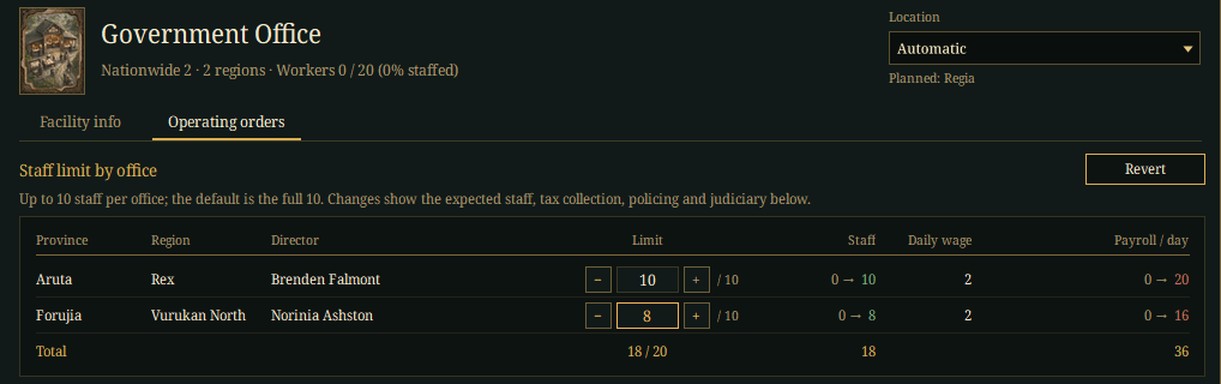
Operating orders, with the second office lowered from 10 to 8. Staff and payroll show "current → expected". There is no confirm button: a changed limit takes effect at the next midnight, and Revert at the top right cancels it.
Below the table, "Expected effect by region" lists staff, tax capacity, tax per day, policing, judiciary and payroll, and "Available staff" shows the noble labor force (excluding military service), how many are employed or idle, and vacant seats. The preview is based on the nobles who can actually be hired, not on the limit. Public order also depends on regional conditions, so it is not projected.
4. Sharing nobles, and life peeragesA new-game check showed that when there were not enough nobles for full limits, the first office filled up and the others stayed empty (10/8/0/0 across four offices). Office seats are now handed out one at a time across the country's offices: each office fills from its own region first, then by posting nobles from other regions.
On November 24 the initial master was changed to place one Government Office and one Clinic in every region a country owns, and the initial noble population was raised so the offices can be staffed. In addition, when an operating state office has no director, the daily hiring now grants a life peerage to a local merchant, artisan or farmer, in that order, to serve as director. The peerage lasts for the average remaining life of a 30-year-old at the time it is granted, and it is not added to the hereditary noble population. As a result, an office can be queued for construction even when no noble is free. The collection efficiency in the administration table is now the average of the latest record of each province in the region, with equal weight per province.
What was checkedFocused tests cover the tax aggregation (TaxCollectionHistoryService), the per-office limit with its next-midnight effect and revert, the even distribution of nobles across offices, life peerages, and the per-province efficiency average. For the screen, a Debug build made from main on November 24 (4c6e3d0) was started without showing a window, and the facility screen's automated checks (30 days of tax records across 2 regions, 2 offices, changing and reverting a limit) passed in both Japanese and English before the captures were taken.
Not done yet- UI-092 and ECO-010 are awaiting the user's review, so the layout and figures may still change.
- Clinics and state warehouses still cap their hiring by population, and the other operating orders have not yet been aligned to the "takes effect at midnight" rule.
- These captures showed that the English tax breakdown still prints one region name in Japanese, so the English images here leave that part out.
The images are actual game screens from a Debug build made from main on November 24 and started without showing a window. They use a verification state started from the initial master, not a user's save. A new game has no tax settlement records yet, so the tax chart draws 30 days of sample records placed in memory only for the capture (nothing is saved); the amounts and efficiencies are therefore sample values. The Japanese article uses the Japanese screen and this article the English one.
See the files currently available and the development status on the download page