DEVELOPMENT SNAPSHOT #76 — Appoint from the Platoon Window: Candidates Shown by What the Post Needs
Contributed by: Takeshi Miyaoka on Monday, November 02 2026
Last modified on Monday, November 02 2026
Clicking a regiment card below the map now opens that regiment's platoon selection window. A regiment summary sits at the top and the list of platoons below it, so vacant posts for regiment commander, adjutant and platoon leaders are visible at a glance. 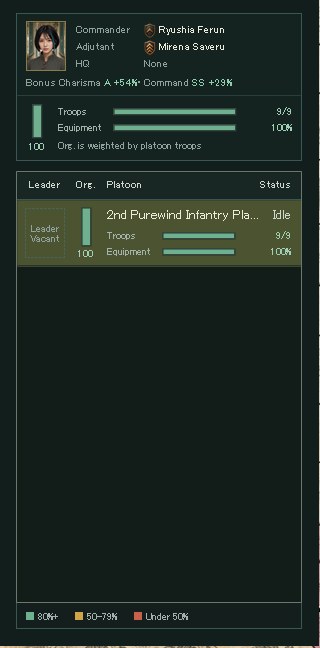
The regiment's platoon selection window, captured for verification in a development debug build (the window's title row is cropped). It shows the commander's and adjutant's rank insignia and names, the adjutant's bonus, the regiment's troops, equipment and organization, and a platoon row whose vacant leader slot is drawn with a dotted frame as "Leader Vacant". People and numbers come from a verification setup and may change.
You can now appoint the regiment commander, adjutant and platoon leaders directly from this window. The candidate panel shows the ability grades and leanings that matter for that post, so you can compare who suits which role before choosing.
From a regiment card to its platoonsThe platoon window follows on from the compact unit window beside the map introduced in #49, now organized by regiment. When every platoon in the list belongs to the same regiment, the window's title becomes the regiment's name, with its status and platoon count on the right.
- Regiment summary: the commander's portrait, the commander's and adjutant's insignia and names, the headquarters platoon, troops and equipment bars, and an organization gauge. The regiment's organization is the average weighted by platoon troops.
- Platoon rows: from left, the leader's portrait (rank insignia at the lower right, a dotted frame when vacant), an organization gauge, the platoon name (a flag for the headquarters) and status, and troops and equipment bars. Values are calculated as in the regiment screen's platoon list and colored at 80% and above, 50–79%, and under 50%.
Platoon organization is now calculated as current organization ÷ maximum organization. Before, it showed 0 when the squad type had no control value.
Click a vacancy, and candidates open on the rightA vacancy shows a dotted "+ Appoint" or "Appoint ›"; hovering a current holder's portrait brightens the frame and shows "Replace". Clicking opens a candidate panel to the right of the window, with a triangle pointing at the row being filled. At the top are the current holder and a Dismiss button, then sort buttons and candidate cards. Clicking a card appoints that person immediately and closes the panel. 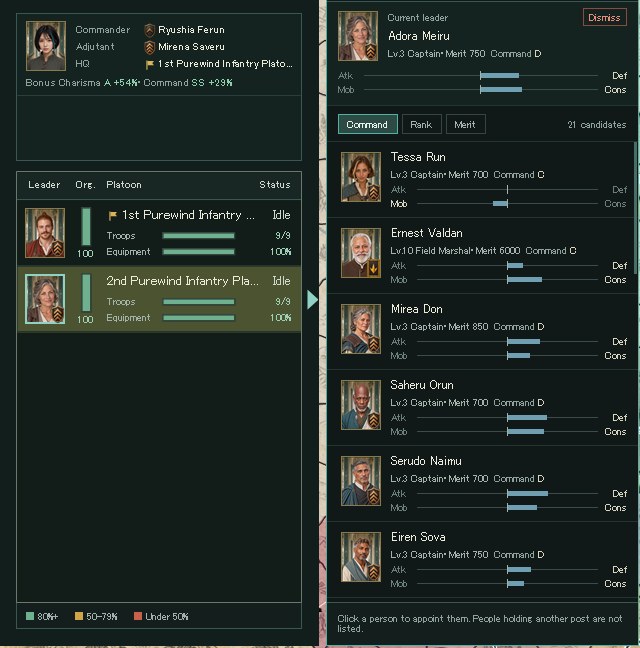
Choosing a leader for the second platoon in the same build. The current leader and Dismiss, sorting by Command, Rank and Merit, and 21 candidate cards. Each card shows level, rank, merit and Command grade, with bars for attack↔defense and mobility↔conservation leanings below.
Candidates follow the same rule as the regiment screen: people of that country who are not already a regiment commander, adjutant, platoon leader or division commander, and not a squad leader in this regiment. Anyone holding another post is not listed, so you cannot pull someone away by accident. After an appointment, the list, the regiment summary and the regiment screen are redrawn right away.
Only the abilities that matter for the postInstead of listing every ability, a candidate card shows only the ones that matter for that post, as grades (S to E, or SS when 100 or more after bonuses): Command for platoon leaders, Charisma and Command for regiment commanders and adjutants. S and A are green and E is orange so they stand out. The default sort also depends on the post: Command for platoon leaders, Charisma for regiment commanders, and Bonus for adjutants.
Platoon leaders and regiment commanders also get bars for attack↔defense and mobility↔conservation, extending from the center toward the side the person leans to. You can tell an aggressive officer from a defensive one without reading numbers. Adjutants do not show these bars because the leanings do not apply to them.
Choose an adjutant by how much they lift the commanderAdjutant candidates show a "Bonus": the result of adding half of the adjutant's abilities to the regiment commander's, as a grade and a percentage increase for Charisma and Command. A regiment with both a commander and an adjutant shows the same line in its summary. 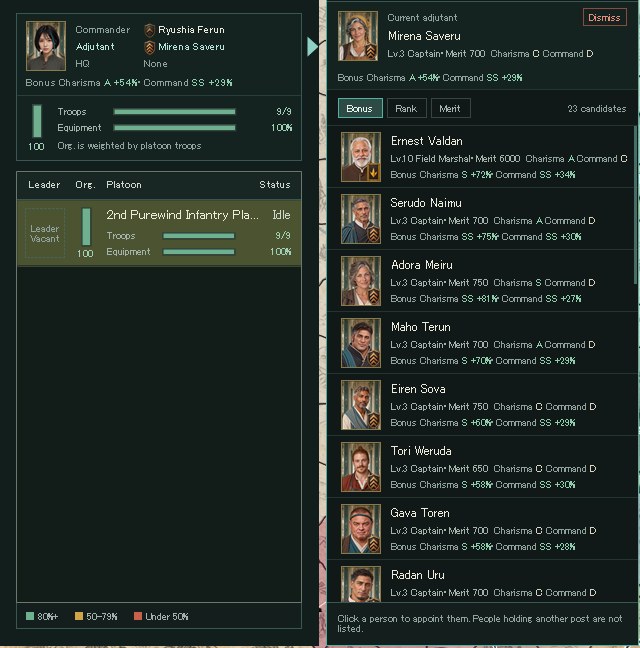
Choosing an adjutant in the same build. After the current adjutant's bonus, candidates are sorted by bonus. Each card shows how far the commander would rise, such as "Bonus Charisma S +72% / Command SS +34%".
The increase is relative to the commander's own ability (half the adjutant's ability ÷ the commander's), so the same adjutant shows a larger increase where the commander is weaker. Sorting by Bonus orders candidates by the sum of their Charisma and Command. For now this bonus is display only; applying it to battles and other gameplay is still to come.
About the imagesAll images were captured from a development debug build drawn off-screen with a verification setup; the window title row and the map are cropped out. People, the country's state and numbers are still being tuned and may change.
About the unit window: DEVELOPMENT SNAPSHOT #49 — Formation Beside the Map: A Compact Platoon Window
Previous article: DEVELOPMENT PLAN #75 — Trust in Your Officers: How You Answer Shapes Their Next Proposals
See the files currently available and the development status on the download page