DEVELOPMENT SNAPSHOT #118 — Personnel Moves into the National Analysis
Contributed by: Takeshi Miyaoka on Monday, November 23 2026
Last modified on Monday, November 23 2026
On November 22, national personnel (the national offices such as the minister, and the administrator of each region) moved into the National Analysis screen. Appointments used to live on a Personnel screen inside Domestic Management; that screen can no longer be opened. Instead, the National Analysis overview shows who holds each office, and you can appoint, replace or dismiss people right from there.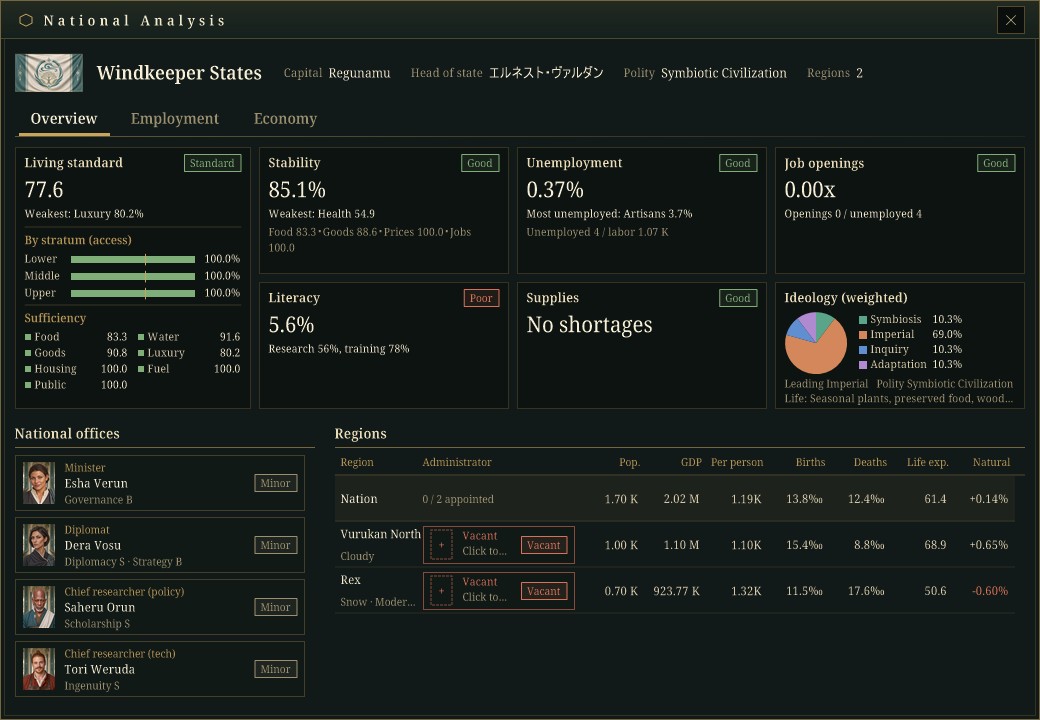
The National Analysis overview (an actual Debug-build screen). National offices is the new section at the lower left; the Regions table at the lower right gains an Administrator column.
1. The lower half of the overview is now personnelThe overview has indicator cards at the top (living standard, stability, unemployment and so on) and a comparison of regions below (the National Analysis was introduced with its demography in #98). This change removes the former "issues and measures" area from the lower half and puts National offices on the left: the minister, the diplomat, the chief researcher (policy) and the chief researcher (tech), with a central bank governor added once researched. Each card shows the office, the person's name and portrait, their main skills (Governance B, Diplomacy S · Strategy B and so on) and how much they sway policy ("Minor" in the picture).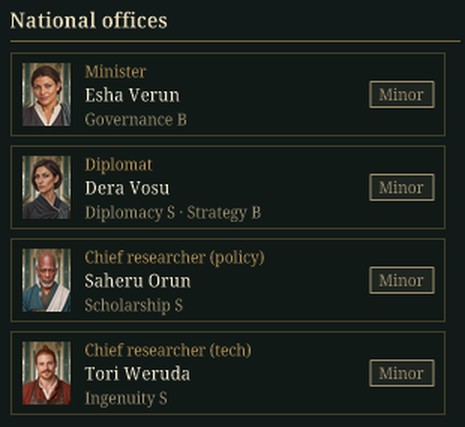
National offices, enlarged 1.5 times from the overview.
2. Click, and the appointment window opens on topClicking an office card opens an appointment window over the National Analysis. Its contents are the same appointment, replacement and dismissal panel that the old Personnel screen had: the current holder at the top, candidates below, and the effect of the appointment shown as before-and-after levels. Appointments and dismissals are reserved and take effect at midnight the next day.
The Regions table now has an Administrator column. The Nation row shows how many are appointed ("0 / 2 appointed"), and each region row shows its current administrator. A region without one shows a red "Vacant" cell, so gaps are visible in the table itself. Clicking that cell opens the administrator appointment window for the region, where candidates are rated on administration, industry and governance, with their effect on construction speed, production and stability.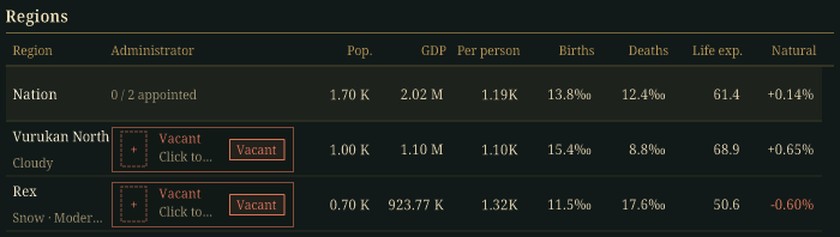
The Regions table, enlarged 1.2 times: both regions have a vacant administrator.
The window closes when you confirm a reservation or cancel, and the National Analysis is redrawn with the new state. Before it opens, appointments and dismissals whose date has passed are applied. Administrator appointments started from other screens, such as Region information, now open the same window, and the Personnel card in Domestic Management opens the National Analysis overview.
3. Keeping headings wholeA follow-up fix the same day widened the padding of the office cards and evened out the column widths of the Regions table so that headings are not cut off.
What was checkedIn a Debug verification run, the capture checked that the calendar flag opens the National Analysis on the overview, that an overview row leads to the Employment page, that National offices lists four offices, and that the appointment windows for the minister, the diplomat and a regional administrator each open (all 680×520 and kept off-screen) before taking the screenshots.
Not done yet- On the English screen, "Click to…" in the vacant cells and the weather "Snow · Moder…" in the Regions table are cut off.
- The head of state's name is still shown in Japanese on the English screen.
- The layout may still change after the user's review.
The images are actual game screens taken on November 22 from a Debug build of this change's work branch (before it was merged into main), launched without showing a window. They start from the initial master data in a verification state (Windkeeper States, 1 December 0237); no user save was used. This English article uses the English screen; images 2 and 3 are enlarged parts of it. Nation, place and character names come from the verification state.
The National Analysis: DEVELOPMENT SNAPSHOT #98 — Birth Rates from Day One: Demography in the National Analysis
Minister proposals: DEVELOPMENT SNAPSHOT #80 — Leave It to the Minister: Domestic Proposals That Carry Themselves Out
Check the files currently available and the development status on the downloads page