
DEVELOPMENT SNAPSHOT #80 — Leave It to the Minister: Domestic Proposals That Carry Themselves Out
- Wednesday, November 04 2026
- Contributed by: Takeshi Miyaoka
- Views: 20
We rebuilt "National policy", the first screen of Domestic Affairs. Its lower half now holds only the minister's proposals, and pressing "Leave this to the minister" on a card has the minister carry it out, all the way to reserving an appointment or changing a budget rate. Until now a proposal's button only opened the related screen, and you had to register the change yourself. 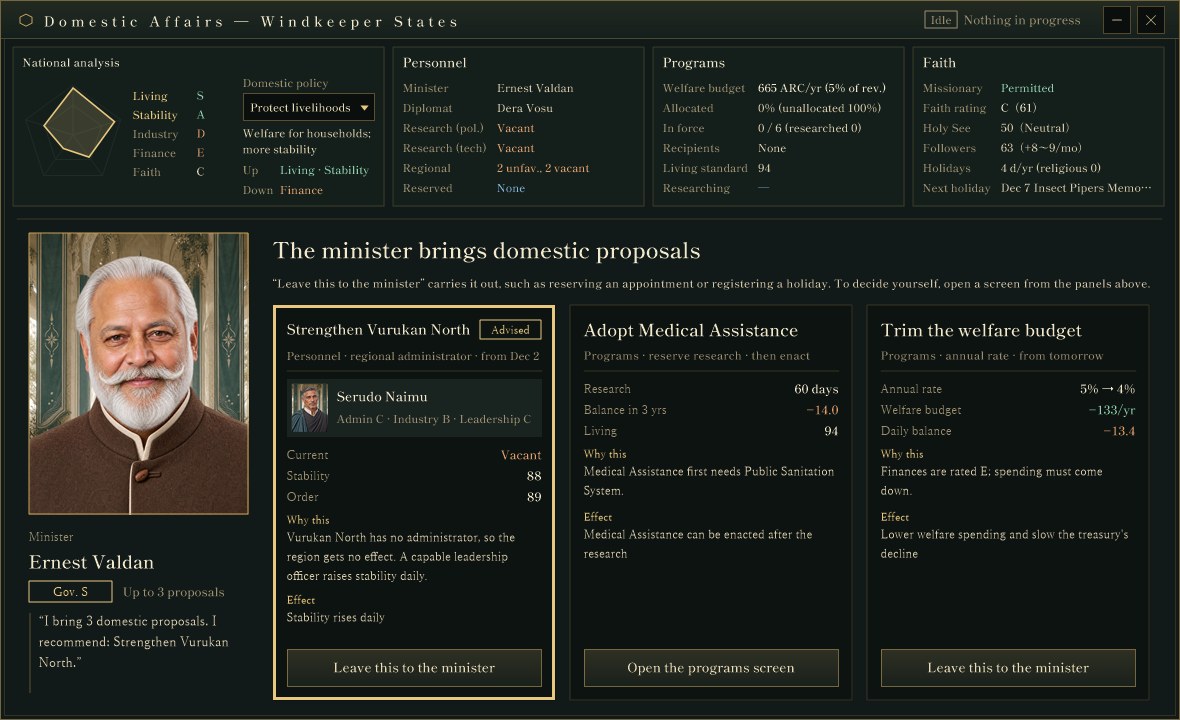
The "National policy" screen of Domestic Affairs, captured for verification in a development debug build. The top row has four panels (National analysis, Personnel, Programs and Faith); below are the minister's portrait and three proposal cards. Numbers come from a verification setup and may change.
The same "an officer brings you proposals" layout used for the budget (#71) and the researcher (#74) now greets you at the entrance to Domestic Affairs.
Four panels on top, each one a way inThe window grew from 1180×640 to 1180×720, the same size as the budget and researcher proposals. The top row is National analysis (the pentagon chart and domestic policy) plus summaries of Personnel, Programs and Faith. The finance panel is gone; taxes open from the minister's "review taxes" proposal or from "Open tax policy" on the sub-screens.
The Personnel, Programs and Faith panels no longer carry an "Open ›" label. Hovering a panel outlines it in gold, and clicking the panel itself opens that screen.
The minister's portrait and three cardsOn the left of the lower half are the minister's large portrait, name, governance grade and a short remark; on the right are the proposal cards. The number of cards follows the minister's governance grade: one at E, two at D to C, three at B or above. Missing cards appear as hidden proposals, showing that more will come with a higher grade. The advised proposal gets a thick gold frame.
- Under the title, one line gives the area, what will be registered and when (for example: Personnel · regional administrator · from Dec 2).
- Personnel proposals show the candidate's portrait, name and abilities.
- Related values (current administrator, stability, order, annual rate, daily balance and so on), the reason and the effect follow.
Pressing "Leave this to the minister" has the minister register the proposal on the spot:
- Personnel: reserve that person's appointment (effective at 0:00 the next day).
- Religious holiday: register a one-day religious holiday on the first free day from tomorrow.
- Missionary permission: an order lifting the ban.
- Enacting a welfare program: allocate the unallocated budget to it (other allocations stay as they are).
- Adopting a welfare program: reserve the research.
- Trimming the welfare budget: lower the annual rate by one point.
An entrusted card keeps a "Done" note with what was registered, plus where to undo it (the personnel screen, the queue or the relevant screen). 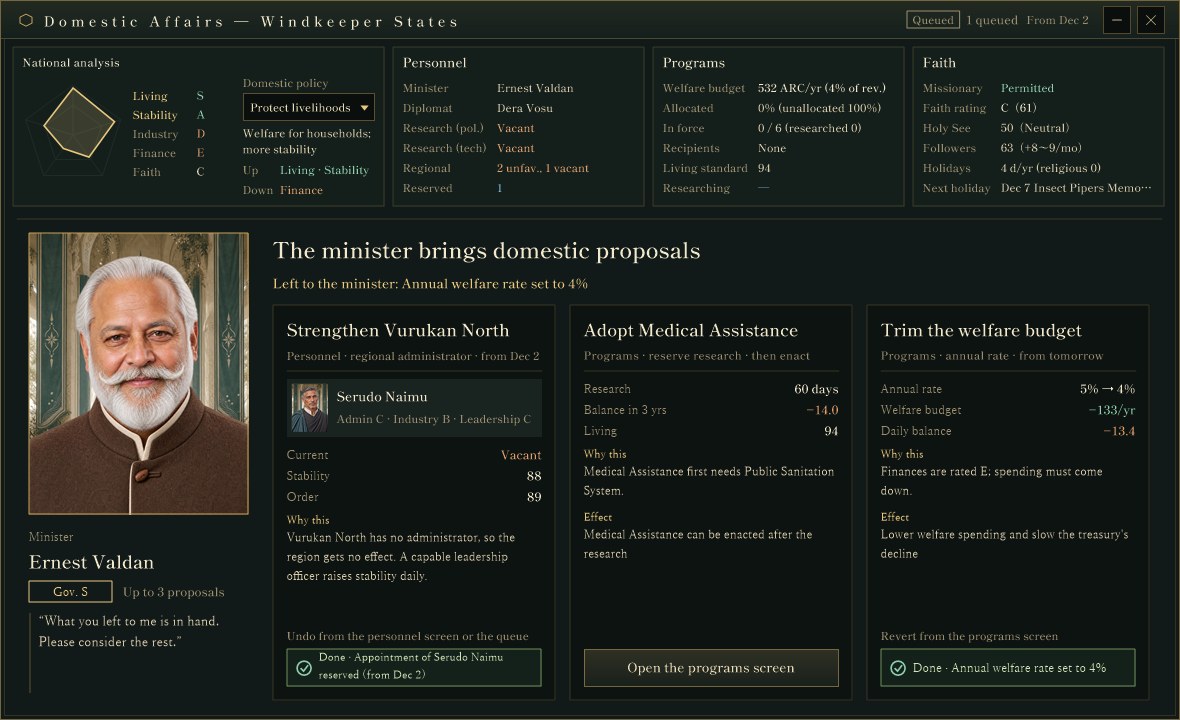
The same build after leaving "Strengthen Vurukan North" and "Trim the welfare budget" to the minister. The first reserved Serudo Naimu's appointment from Dec 2, so the Personnel panel shows one reservation and the top right reads "1 queued · From Dec 2". The second set the annual welfare rate from 5% to 4%, and the welfare budget in the Programs panel dropped with it. "Adopt Medical Assistance" in the middle needs research that is not done yet, so its button reads "Open the programs screen".
Proposals that cannot be decided automatically (missing prerequisite research, no free research slot, nothing left to allocate) and tax reviews switch their button to "Open the programs screen", "Open the tax screen" and so on, and open the related screen instead.
National offices and regional administrators move to PersonnelThe national office cards (minister, diplomat, chief researchers) and the regional administrator cards that used to fill the lower half now live on a Personnel screen opened from the top-row panel, with larger cards. Clicking a card opens the small window to replace or dismiss, or to appoint when the seat is vacant. Administrators are listed unfavorable and vacant first, with "All" and "Unfavorable" filters. 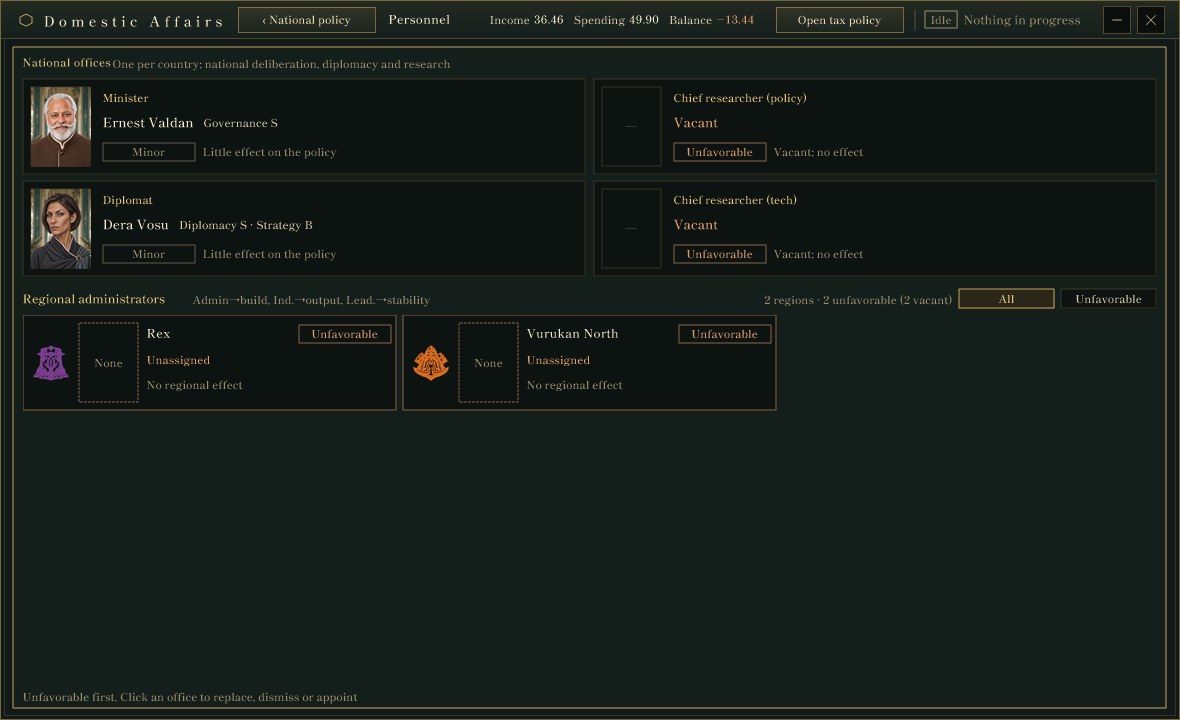
The Personnel screen in the same build: four national offices on top and the regional administrator cards below. In this country both chief researcher seats and both regional administrator seats are vacant.
Building on #68, which brought personnel into Domestic Affairs, the roles are now split: National policy is where you read and entrust the minister's proposals, and detailed appointments happen on the Personnel screen.
About the imagesAll images are Domestic Affairs windows captured from a development debug build drawn off-screen with a verification setup. The country's state, numbers and characters are a verification setup that is still being tuned and may change.
Previous article: DEVELOPMENT PLAN #79 — Warning Before It Runs Short: A Supply Outlook
See the files currently available and the development status on the download page