
DEVELOPMENT SNAPSHOT #71 — The Minister Brings the Budget: Allocations, Bond Terms, Midyear Top-Ups
- Friday, October 30 2026
- Contributed by: Takeshi Miyaoka
- Views: 22
The annual budget introduced in #46 worked like this: in January you set one discretionary limit, and you could top it up if it ran short. But it was a single number. It said nothing about whether the money would go to the army or to construction, and typing one number did not feel much like setting national policy.
This round of development rebuilds the budget screen. Every January the tax minister now brings budget proposals (UI-051); the budget is split across welfare, armaments, construction, research, stockpile and a reserve (FIN-019); bond rates depend on the term and principal is repaid every year (FIN-018); and short fields can get a supplementary budget during the year. The budget is now its own window that can be closed or minimized (UI-050). 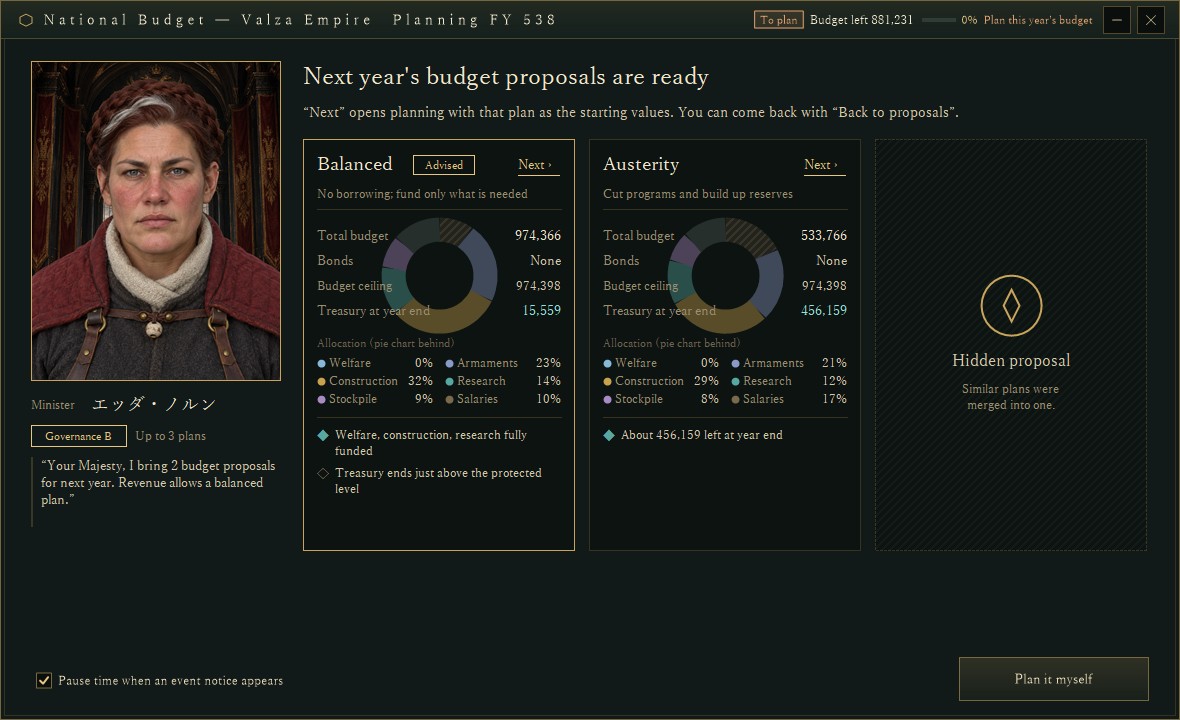
The January budget proposal event, captured for verification in a development debug build (2026-10-30). A minister with governance grade B offers two plans, Balanced (marked Advised) and Austerity; the third card is face down because similar plans were merged into one. Country and amounts come from a verification setup and may change.
In January, the minister brings proposalsFor the player's country, if no allocation has been decided yet in January, the budget window opens once a year as a proposal event. If "Pause time when an event notice appears" is on, the clock stops too.
The proposals come from the same tax minister as the tax policy screen in #65. The number of plans depends on the minister's governance grade: one at E, two at D or C, three at B or above. There are three kinds, each judged by the expected treasury at year end:
- Balanced: the largest budget that keeps the year-end treasury above the protected cash the country holds back.
- Austerity: halfway between what is already spent or committed and the balanced budget. Fewer programs, bigger reserves.
- Expansion: up to the ceiling, including what bonds can add.
If the year is expected to end in surplus, Balanced is marked as advised; if in deficit, Austerity. Plans that come out almost the same (within 5% of the usable amount) are merged, and the leftover card is shown face down. In the first image there is little room to borrow, so Expansion would be nearly identical to Balanced and its card is hidden. A country with no minister gets three face-down cards and a link to appoint one.
Splitting the budget into fields"Next" on a card opens planning with that plan as the starting values. The total budget is on the left; the Allocation tab on the right sets each field's share. 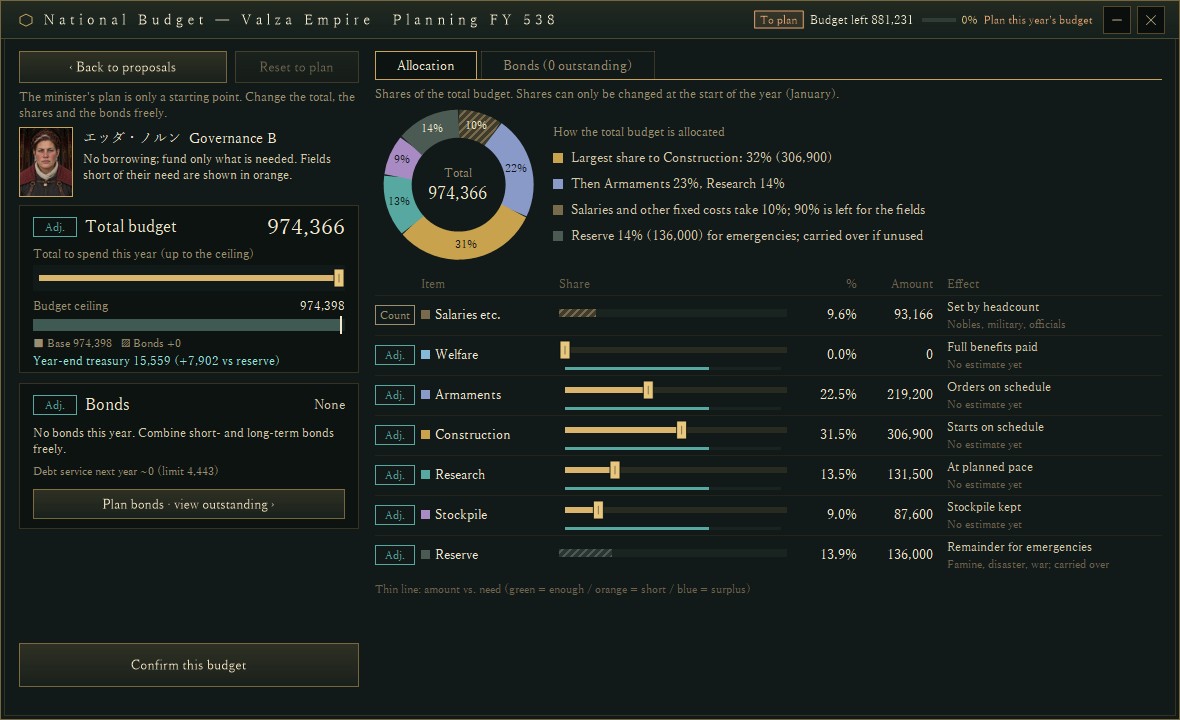
The planning screen in the same build. The donut shows a total budget of 974,366; the table lists fixed costs such as salaries, then welfare, armaments, construction, research, stockpile and reserve with their share, amount and expected effect. The thin line under each row is the share of the estimated need.
Allocations are set in January and cannot be changed during the year. Each kind of spending (research costs, stockpile purchases, weapon materials and so on) is charged to its field, and anything that fits no field is paid from the reserve. When a field's allocation runs out, new spending in that field stops until a supplementary budget is passed. Welfare is not stopped; instead the daily benefits are reduced in proportion to how far its allocation falls short of the need. An unused reserve carries over to the next year.
These limits apply only to a country that planned its budget for that year. Unplanned years and AI countries keep running without field limits, as before.
Bond rates follow the term, and principal is repaid every yearThe government bonds added in #69 are now arranged on this screen's Bonds tab. Terms run from 1 to 10 years, and each year of term adds 0.25% to the one-year rate (3.50% for one year up to 5.75% for ten in the verification setup). Shorter bonds cost less interest but mean heavier yearly repayments.
New bonds repay their principal in equal parts every 365 days. Besides the existing cap on outstanding debt (60% of expected annual tax revenue), issuing is now checked against the heaviest future year: principal and interest due in that year must stay within 20% of expected annual tax revenue. In January you can register as many bonds as you like; "Confirm this budget" issues them in order. Bonds issued later see more debt outstanding, so their rates are higher.
During the year, top up the fields that run shortFrom February the same window becomes the execution screen. For each field it shows the share spent or committed, today's planned pace (a white line), and where the current pace will end the year. 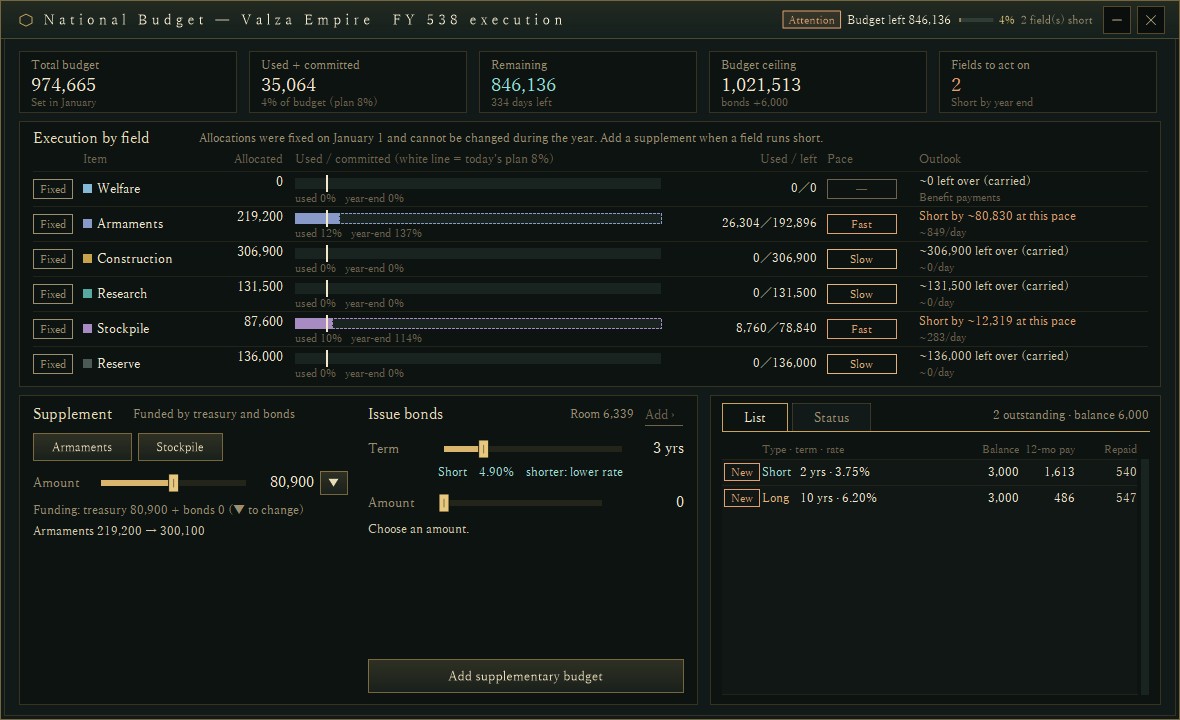
The execution screen in the same build. Armaments are on course to reach 137% of their allocation by year end, and the stockpile 114%; the summary tiles count two "fields to act on". In the supplementary budget at lower left, buttons appear only for those two fields.
Supplementary budget buttons appear only for fields expected to run short (construction and the reserve are excluded). Pressing one sets the amount to that shortfall; it can be funded from spare treasury cash and from the part of the bond-raised ceiling not yet used. The idea is to spot a field that is spending too fast partway through the year and deal with it, rather than scramble once it has run dry.
About the images and numbersAll images were captured from a development debug build using a verification setup that advances to the next January, adds test funds to the treasury and appoints a minister. Country, people, amounts and rates are still being tuned and may change.
Where the budget started: DEVELOPMENT SNAPSHOT #46 — The January Budget: Planning Room for Next Year
The banks that buy the bonds: DEVELOPMENT SNAPSHOT #69 — When a Money Changer Becomes a Bank: Deposits, Discount Rate, Bonds
Previous article: DEVELOPMENT PLAN #70 — Turning Deposits into Workshops: Bank Loans for Private Expansion
See the files currently available and the development status on the download page