
DEVELOPMENT SNAPSHOT #68 — The Cabinet in One Window: Personnel Joins Domestic Affairs, and Reserved Appointments Can Be Swapp
- Wednesday, October 28 2026
- Contributed by: Takeshi Miyaoka
- Views: 28
Where do you go to see who is actually running your country? Until now, appointing the minister, the diplomat and each region's administrator happened on a separate Personnel screen, while national policy, welfare, faith and finance lived on the Domestic Affairs screen. Choosing a person and checking how the country would change meant switching back and forth.
This round of development retires the Personnel screen and moves every appointment, replacement and dismissal into the Domestic Affairs window (DOM-037). It also adds a way to swap an already reserved appointment for a different person (DOM-033), and shows post-research projections on the minister's proposals (DOM-035). 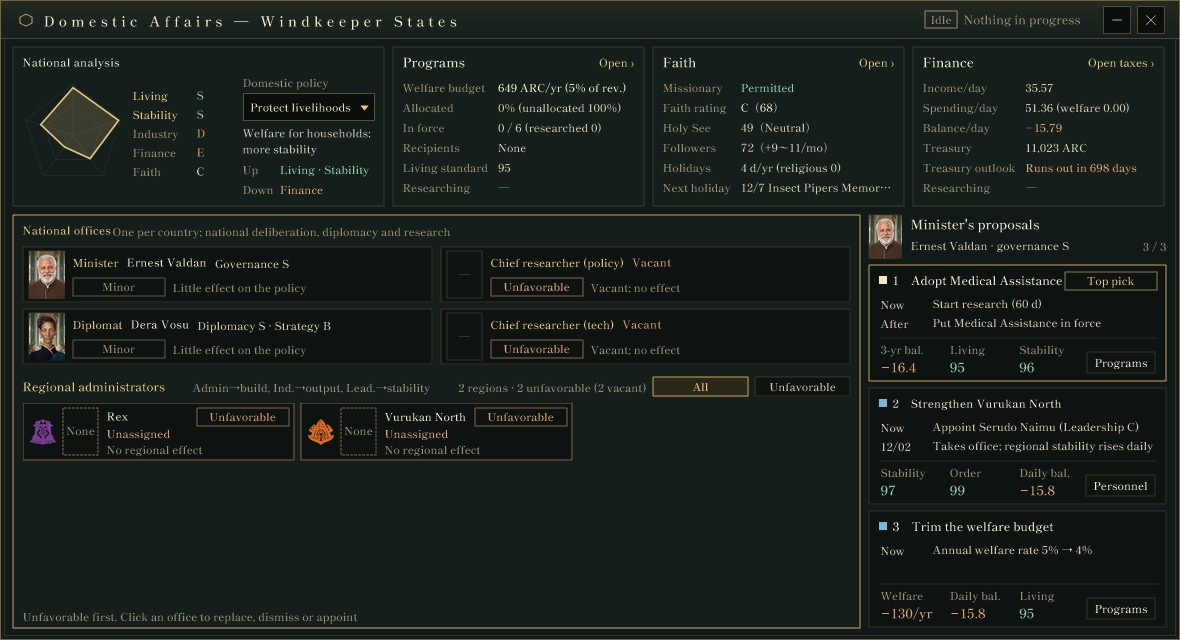
The Domestic Affairs window of the Windkeeper States, captured for verification in a development debug build (2026-10-28). National analysis and the program, faith and finance summaries sit on top; national offices and regional administrators below; the minister's proposals on the right. Values are still being tuned and may change.
The state of the country, its people and its proposals in one windowDomestic Affairs is now a movable 1180×640 window over the map. National analysis at the top left scores Living, Stability, Industry, Finance and Faith from 0 to 100, and shows each as an S–E grade and on a pentagon chart. While a tax change is reserved, the current values are drawn as a grey dashed line and the values after the reservation takes effect as a gold line.
Next to it are summaries of programs (welfare), faith and finance, each with a link to its own screen. The title bar shows how many reservations (personnel, taxes, research starts and so on) are pending and when the earliest one takes effect.
The domestic policy inside national analysis is one of four: Protect livelihoods, Grow industry, Restore finances, or Faith and order. The policy itself has no effect. It decides which items matter, and that is the yardstick for judging officials and for the minister's proposals. The country in the image protects livelihoods, so Living and Stability are the items to raise, and Finance (welfare spending) is shown as the item proposals tend to lower.
Favorable, unfavorable or minor depends on ability and policy togetherThe Favorable, Unfavorable and Minor tags on each office come from the grades of the person's abilities that affect the items the policy emphasizes. Leadership affects Stability, Industry affects Industry, Administration affects Living, Governance affects Finance and Diplomacy affects Faith. If the best relevant grade is B or better the office is favorable; if the worst relevant grade is D or lower it is unfavorable; otherwise it is minor. A vacant office is unfavorable.
The minister in the image has Governance S, but Governance affects Finance, which a livelihood-protecting country does not emphasize, so the tag is Minor. A brilliant official does not move the needle if they do not fit the national policy. Regional administrators are listed unfavorable and vacant first, with All and Unfavorable filters.
National offices are appointed from the same windowThere are four national offices, one each per country: the minister, the diplomat, the chief researcher (policy) and the chief researcher (tech). These could previously be filled only on the Personnel screen. Clicking one now opens the same kind of dialog used for regional administrators. 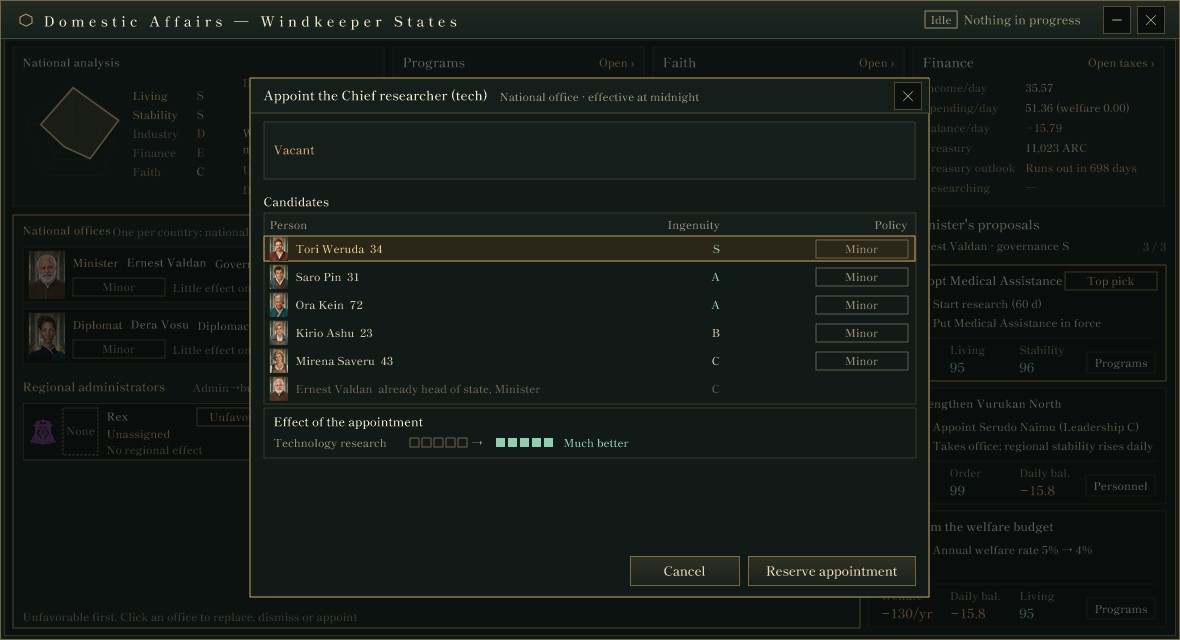
The same build after clicking the vacant Chief researcher (tech) office. Candidates are sorted by the key ability (Ingenuity), and the person who is already head of state and minister is listed as unavailable, with the reason.
The dialog shows the current holder (or the person due to take office), candidates sorted by the key ability, people who cannot hold the post alongside another office, and the effect of the appointment. The effect compares "current → candidate" with five squares; appointing an S-grade person to a vacant post, as in the image, reads Much better. A tech chief researcher's Ingenuity shortens technology research by up to 20%. Appointments, replacements and dismissals all take effect at midnight at the start of the next game day.
With this merge, the Personnel screen and its tests and capture steps were removed (a net reduction of about 1,200 lines). The Personnel button in the menu now opens Domestic Affairs, and the Domestic Affairs button has been reassigned to the resources and prices screen. When Domestic Affairs opens, appointments whose effective date has passed are applied before it is drawn.
Swapping the person due to take officeBecause appointments take effect at the next midnight, you sometimes realize after reserving one that a different person would have been better. That used to take two steps: cancel the reservation, then appoint again. A reserved appointment can now be swapped directly. 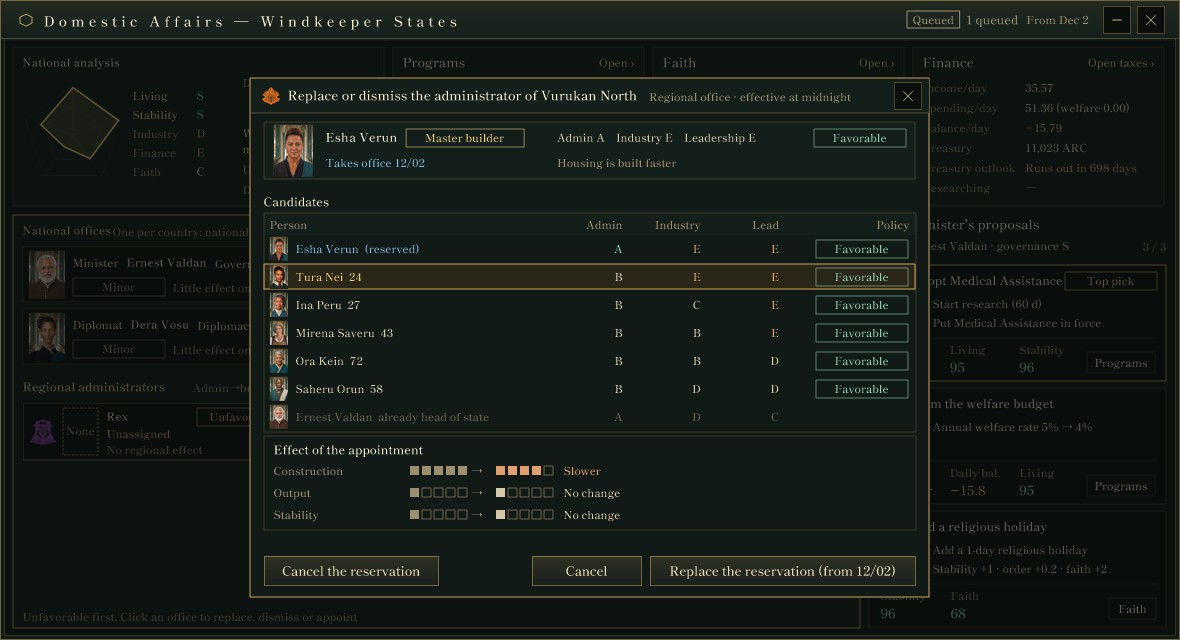
The same build after reserving Esha Verun (taking office 12/02) as administrator of Vurukan North, then opening the replacement dialog and selecting Tura Nei.
While someone is due to take office, they appear first in the candidate table, marked as reserved. Selecting another candidate and pressing "Replace the reservation (from 12/02)" cancels the original reservation and reserves the new appointment for the same effective date. This is published as one operation; if the new reservation cannot be made, the original one stays. Reservations to dismiss someone are not swapped.
In the image, replacing Esha Verun (Administration A) with Tura Nei (Administration B) drops one square from construction speed and reads Slower. The "Master builder" tag next to a name marks a person whose ability for an emphasized item is A or better; it is a label only and has no effect. The point is to see what you give up before you swap.
Under the hood, cancelling and re-reserving the same person on the same day is now treated as a separate reservation, so repeated swaps never mix a cancelled reservation with a new one.
Post-research projections on the minister's proposalsThe number of proposals on the right depends on the minister's Governance grade (E = 1, D–C = 2, B or better = 3). Starting from the emphasized items with the lowest scores, the minister proposes one step each, such as introducing a welfare program, replacing an administrator, trimming the welfare budget or adding a religious holiday. A proposal's button only opens the relevant screen; nothing is enacted directly from a proposal.
Proposals that need research used to show only today's values. They now show the projected daily balance, living standard and stability three years ahead if the program were put in force with the current allocation. The three-year balance is computed from the tax screen's multi-year simulation plus the change in welfare spending. In the image, "Adopt Medical Assistance" projects a daily balance of −16.4, living standard 95 and stability 96. When no projection can be computed, current values are shown.
About the images and numbersAll images were captured for verification in a development debug build. The appointment reservation and its replacement were set up by a capture script to check the screens. People, country names, ability grades and projections are still being tuned and may change.
The old personnel screen: Ashwind Chronicle Developer Blog #19 — Taxation, Personnel, Production
The multi-year tax simulation: DEVELOPMENT SNAPSHOT #65 — See Five Years Ahead Before You Touch a Tax: Health Scores and Reform Plans
Welfare programs and allocation: DEVELOPMENT SNAPSHOT #66 — Sharing a Welfare Budget Across Six Programs: Employment Support and Elder Care
Previous article: DEVELOPMENT SNAPSHOT #67 — State Cargo Takes to the Air: Dock-to-Dock Routes and the Break-Even with Land
See the files currently available and the development status on the download page