DEVELOPMENT SNAPSHOT #84 — Taxes Join Domestic Affairs: A Tax Plan You Can Delegate
Contributed by: Takeshi Miyaoka on Friday, November 06 2026
Last modified on Friday, November 06 2026
Taxes have joined the minister's proposals on the "National policy" screen of Domestic Affairs. The card carries the single best tax plan the minister found, and "Leave this to the minister" hands over both the research it needs and the tax changes that follow once that research is done. Along with this, the tax policy screen now opens inside the Domestic Affairs window, and the top row of the window has four columns: Personnel, Taxation, Welfare and Faith. 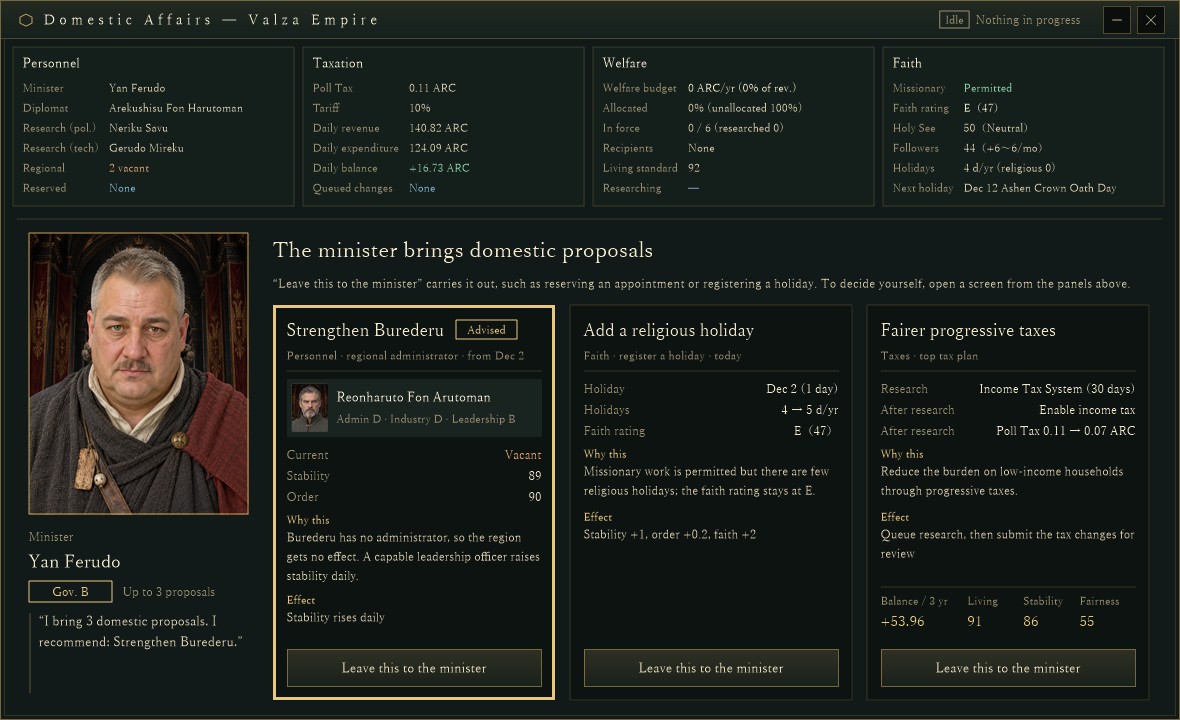
The "National policy" screen of Domestic Affairs (Valza Empire), captured for verification in a development debug build. The second column at the top is the new Taxation panel; the card on the bottom right is the tax proposal "Fairer progressive taxes". Numbers come from a verification setup and may change.
Before: taxes only "opened a screen"In #80, the minister's proposal cards learned to carry out appointments, welfare budget changes and more. Tax reviews were the exception: their button turned into "Open the tax screen", and you picked a plan yourself from the reform plans at the bottom of the tax policy screen (#65). We have now moved those reform plans onto the Domestic Affairs proposal cards, so a tax plan can be delegated like any other proposal.
Top row: Personnel, Taxation, Welfare, FaithThe top of the National policy screen is now four panels of equal width. The new Taxation panel has six lines:
- The poll tax in force (per person per day) and the standard tariff rate
- Daily revenue, expenditure and balance (green for a surplus, red for a deficit)
- The number of queued tax changes ("None" if there are none)
Rates that have not taken effect yet are never shown as in force. As with the other panels, hovering outlines it in gold, and clicking it opens the tax policy screen.
The tax policy screen moves inside Domestic AffairsThe tax policy screen used to be a window of its own. It now opens inside the Domestic Affairs window (1180×720), just like the Personnel, Welfare and Faith screens. Its title bar shows "‹ National policy", the screen name, and the daily income, spending and balance, the same figures as the Taxation panel. In verification we also checked that when spending changes during the same day, the tax screen and the Domestic Affairs header update together. 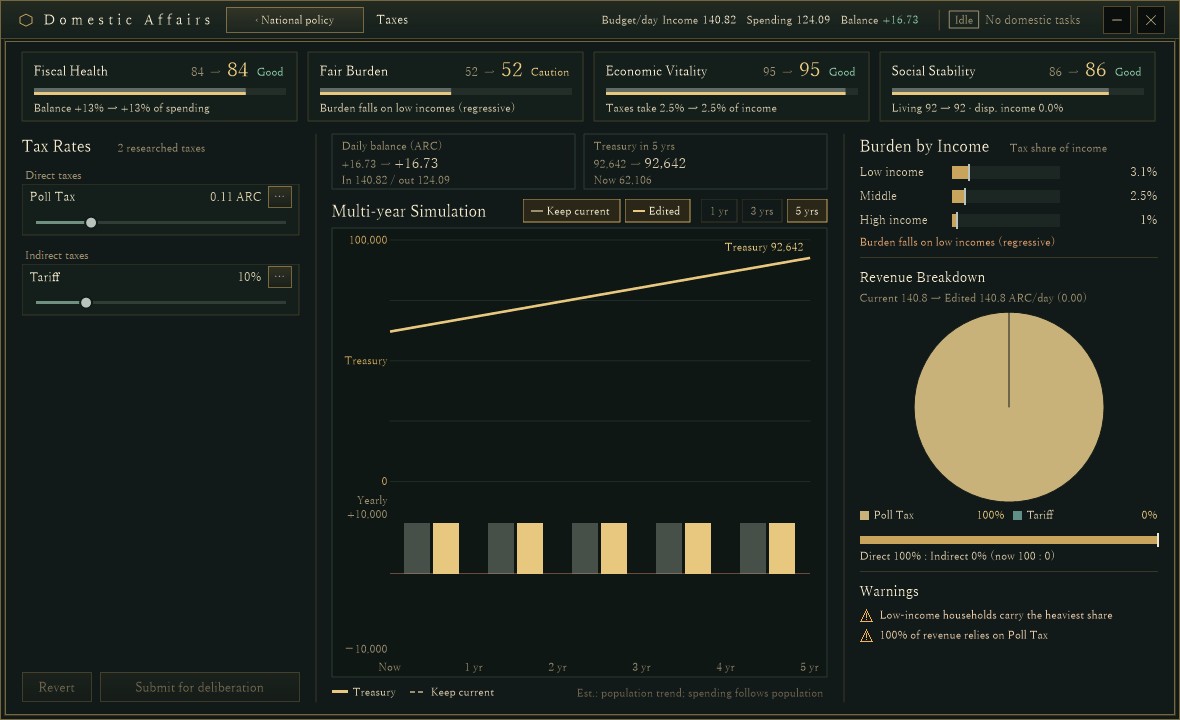
The tax policy screen from the same build: four health scores across the top, sliders for the researched taxes (poll tax and tariff) on the left, a five-year simulation in the middle, and the burden by income and revenue breakdown on the right.
- The reform plans and the minister appointment controls at the bottom of this screen were removed. Plans now live on the National policy cards, and appointments on the Personnel screen.
- The freed space went to a larger simulation chart and pie chart.
- Each tax row now has two lines: the tax name, rate and detail button on top, and a slider with more room to move below.
- The "Open tax policy" button in the title bar of the sub-screens was removed; taxes are reached from the Taxation panel.
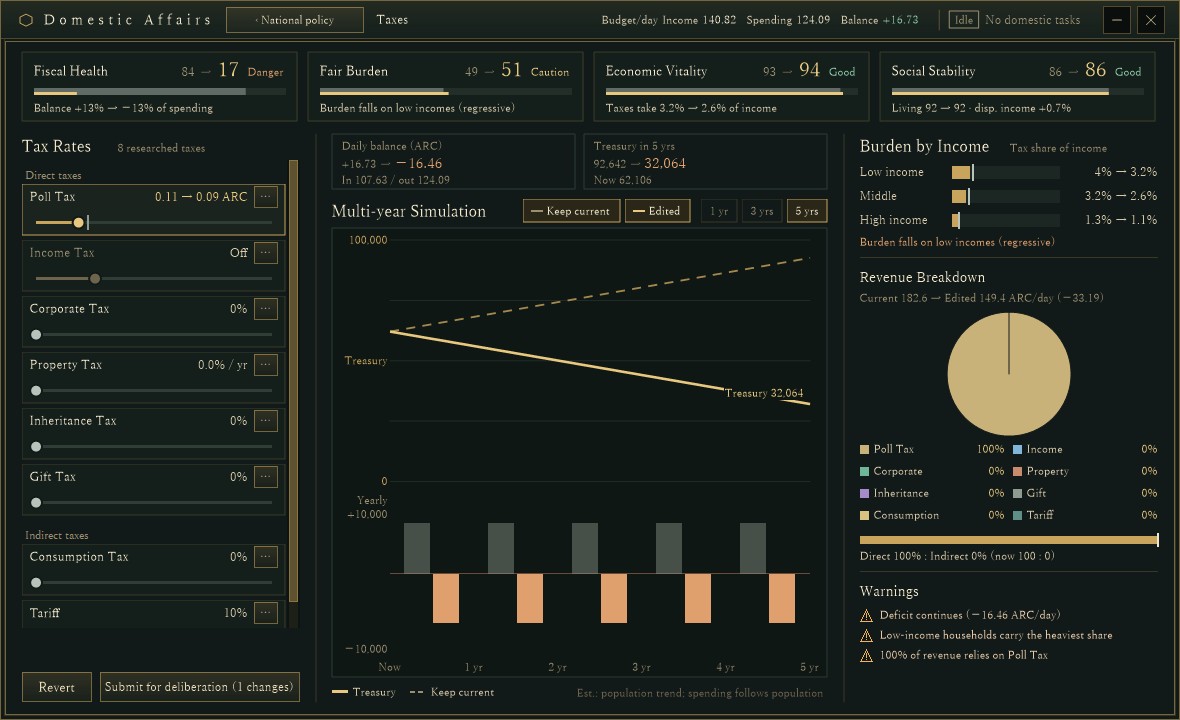
The same screen with all eight taxes researched and the poll tax drafted from 0.11 to 0.09 ARC, set up for verification. The list scrolls on its own, and the dashed line shows the treasury if nothing changes.
The tax card: one top planThe minister compares candidates such as relieving households, stronger progressive taxes, fiscal repair and broadening the tax base with a five-year simulation (the same idea as in #65), and puts only the highest-scoring plan on the card. The card shows:
- Steps: research and rate changes in order, for example "Research: Income Tax System (30 days)", "After research: Enable income tax", "After research: Poll Tax 0.11 → 0.07 ARC".
- Why this plan, and its effect.
- The expected balance, living standard, stability and fairness after three years.
"Top tax plan" on the card means the best plan among the tax candidates. Which of the three cards gets the gold "Advised" frame is still decided by the overall domestic order, which is why the personnel card remains advised in the picture.
"Leave this to the minister": from research to reviewWhen you delegate the tax card, the minister queues the research it needs and holds on to the tax changes for after that research.
- Once the research has actually finished, the held changes are submitted for the normal tax review in the daily tax processing. Rates do not change until the review passes.
- Each country can hold one delegated tax change, and it survives saving and loading. It never overwrites a proposal of your own that is under review, and it respects the waiting period after a rejection.
- If political institution research is already under way, that research comes first. The first version refused the delegation when the research slot was busy; the same day we changed it so the minister queues the research at 0:00 on the first day the slot is free. The card then reads "Tax plan queued (research first)", and the Taxation panel shows the waiting change.
Taxes are a field where research and rate changes pile up in sequence, and it is easy to lose track when you follow them yourself. This change lets you hand the minister not just one step, but the whole order of what to do.
About the imagesAll images are the Domestic Affairs window captured from a development debug build drawn off-screen with a verification setup. The minister appointment, the tax card in the third slot, the extra spending on the same day, and the fully researched taxes were all set up for checking the screens. The country's state, numbers and people are still being tuned and may change.
Previous article: DEVELOPMENT PLAN #83 — The Ruler's Charge: Quarterly Goals from the Head of State
See the files currently available and the development status on the download page