DEVELOPMENT SNAPSHOT #86 — The Production Window Looks Ahead: Shortages and What to Build
Contributed by: Takeshi Miyaoka on Saturday, November 07 2026
Last modified on Saturday, November 07 2026
We rebuilt the right side of the Production screen, the detail of the selected order. One window now shows the equipment picture and description, five indicators, the national supply of every material, the efficiency of each assigned region, and two new sections, "Effect of this order" and "Outlook", so you can see what to build before a material runs short. Material cards can now open the Resource Market, and the middle button of the main menu opens the Resource Market as well. 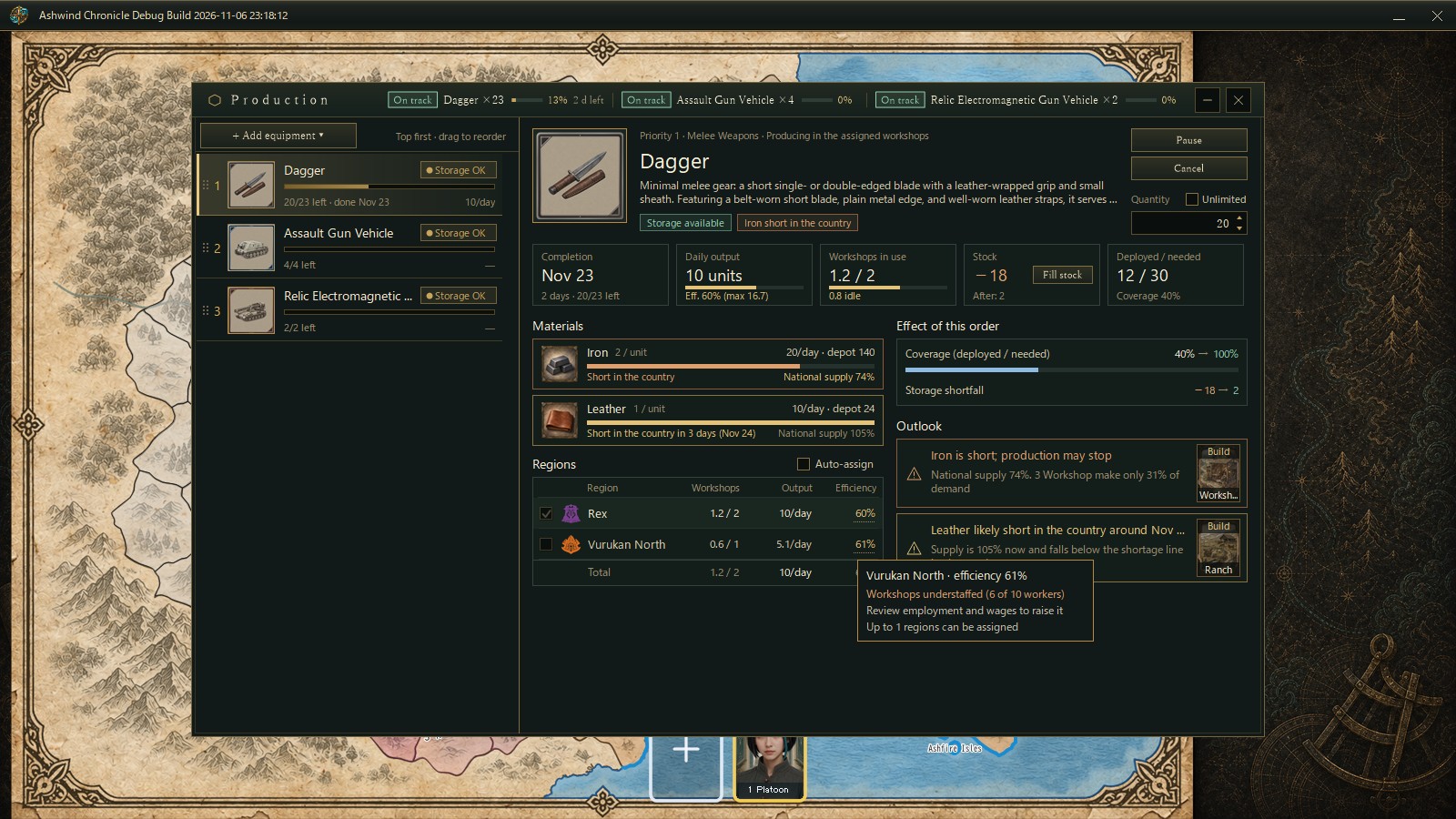
The Production screen captured for verification in a development debug build, with a Dagger order selected. The order list is on the left and the new detail on the right; the tooltip explains a region's efficiency. Numbers come from a verification setup and may change.
Before: is it producing, and when will it stop?Production orders have been in the game from the start (#05). The old detail, however, showed a small equipment image and no material images, and it did not tell you how much slack the materials had or how efficient production was. It could not show whether changing the assigned regions would raise or lower efficiency, what the equipment would improve, or what problems lay ahead and how to deal with them.
A 1180×720 window with five indicatorsThe window is now 1180×720 (it shrinks to a height of 600 when the game screen is short). Each row of the order list shows a 52px equipment image, the completion date and the daily output. At the top of the detail are the equipment picture and description, the Pause, Cancel and Quantity controls, and below them five indicators: 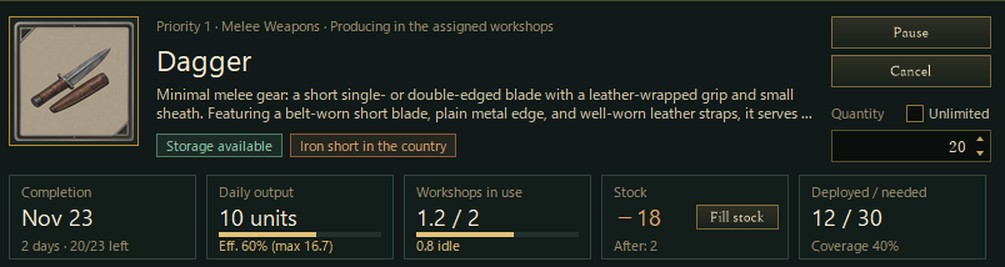
- Completion (days and units left)
- Daily output and efficiency (current efficiency and the output at its maximum)
- Workshops in use (and how many are idle)
- Stock and "Fill stock" (the storage shortfall and the figure after completion)
- Deployed / needed and the coverage
The top of the detail in the English UI: the equipment card, the order controls with the new "Unlimited" check box, and the five indicators.
Long text such as descriptions and equipment names is shortened to fit, and hovering shows it in full.
Materials read as national supplyEach material card shows the resource image, the amount per unit, the daily use, the production depot and a bar for the national supply ratio. The line under it, such as "Short in the country" or "Short in the country in 3 days (Nov 24)", comes from the supply and demand of the whole country.
The first version showed how many days the depot would last. We then found a mismatch: the Resource Market showed iron being produced at a 111% supply ratio, while the Production screen said iron was "short, production stopped". We fixed it the same day. The production depot is only the next day's share, which the assigned regions procure at 0:00 every day and use that day, so an empty depot does not mean production has stopped. Now a card says production has stopped only when the order has actually stopped for lack of materials.
Regions and why efficiency dropsThe assigned regions are now a table of workshops, output and efficiency per region. Check boxes add or remove a region; while "Auto-assign" is on, regions cannot be picked by hand. Hovering an efficiency value explains the reason and the remedy, for example "Vurukan North · efficiency 61% / Workshops understaffed (6 of 10 workers) / Review employment and wages to raise it".
Effect of this order, and the outlook"Effect of this order" shows how the coverage of deployed against needed equipment and the storage shortfall change from now to after completion. "Outlook" picks up four kinds of problems:
- Production stopped for lack of materials
- Short in the country (for example, iron at 74% national supply, with 3 workshops making only 31% of demand)
- Likely to be short in the country (for example, leather at 105% now, falling below the shortage line in about 3 days)
- Rising prices
Each problem comes with an image of the facility to build, such as a workshop or a ranch, and clicking it opens the construction screen for that facility. You can go straight from spotting a shortage to building the answer. 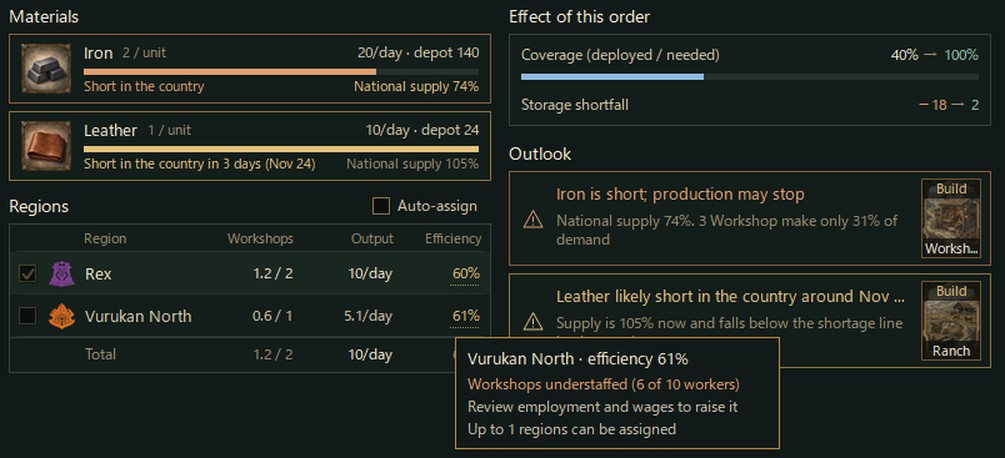
Materials, regions, the effect of the order and the outlook from the same capture. Each outlook entry has a "Build" button with the facility to add.
"Unlimited" quantityThe quantity now has an "Unlimited" check box. An unlimited order keeps producing until you pause or cancel it, and its remaining count does not go down. Its completion then reads "Unlimited", and the stock indicator says it keeps rising while production continues.
From a material card to the Resource Market- Every material card, not only a short one, is outlined in gold with a hand cursor when you hover it. Clicking it opens the Resource Market with that resource selected (before, only cards stopped by a shortage could be clicked).
- The fourth button of the main menu (the coins) now opens the Resource Market instead of taxation, and restores the window if it is minimized. The tax screen is opened from the Taxation panel of Domestic Affairs (#84).
- The resources and prices screen is now titled Resource Market, and the button in the Country Overview window reads "Open Resource Market".
The supply window below the Country Overview (#78) shows what the whole country is short of. The new Production detail shows what this order will run short of, and what to do about it.
About the imagesAll images are the Production screen captured from a development debug build drawn off-screen with a verification setup. The orders, assigned regions, shortages and the unlimited setting were set up for checking the screen. Numbers and names are still being tuned and may change.
Previous article: DEVELOPMENT PLAN #85 — When the Weather Gets to Work: Rain, Snow and Fog on Farms, Roads and Skies
See the files currently available and the development status on the download page