
DEVELOPMENT SNAPSHOT #78 — Shortages Always in View: A Supply Window Below the Overview
- Tuesday, November 03 2026
- Contributed by: Takeshi Miyaoka
- Views: 17
A "Supplies" window now always sits at the top left of the game screen, directly below the national overview. Before, supplies were one status row in the overview, and the breakdown appeared beside it only while you hovered. Now you can see which goods your country is short of without opening anything. 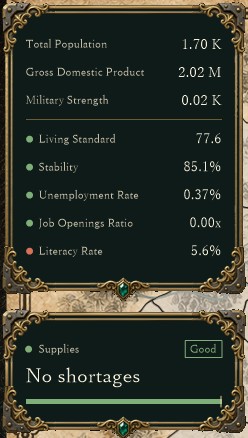
The national overview and the supplies window, captured for verification in a development debug build (the map and title row are cropped). The country had no shortages at this point, so the window is in its short form: the "Good" badge, "No shortages" and a bar for the share of goods that are sufficient. Numbers come from a verification setup and may change.
When something runs short, the goods are listed from the lowest supply ratio, and clicking a row opens the Resources & Prices screen with that item selected.
A separate window, the same width as the overviewThe supplies window uses the same ornamental frame and width as the national overview and sits 8 px below it, the same gap as the national budget window below the calendar. It is fixed in place and cannot be dragged. The overview's status rows are now five: Living Standard, Stability, Unemployment Rate, Job Openings Ratio and Literacy Rate.
- Top row: the label "Supplies" and a Good / Caution / Bad badge.
- Heading: "Short N items", or "No shortages".
- Bar: the share of goods in demand that are sufficient; the right end is the target.
- List: "Short supplies (supply ratio)", with item name, category and supply ratio, lowest ratio first.
The window's height follows its contents and is recalculated whenever the totals change: small on a day without shortages, longer as shortages grow.
Up to 10 items, most short firstThe list shows the same per-item shortages as the Resources & Prices screen, up to 10 items in order of lowest supply ratio. Anything beyond that is folded into one "N more" row. 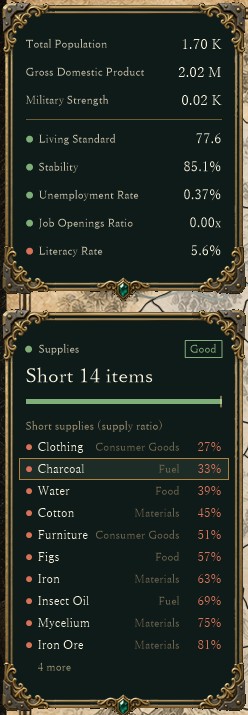
The same build with a sample of 14 short items fed in for verification. Ten items are listed from the lowest ratio (Clothing 27%, Charcoal 33%, Water 39% …), and the remaining four become "4 more". The pointer is on Charcoal in the second row, which is outlined. Items and numbers are a sample, not the country's actual state.
The category (Consumer Goods, Fuel, Food, Materials and so on) appears to the right of each name, so you can tell at a glance whether the shortage is in everyday goods or in production materials.
Click an item to open its Resources & Prices viewThe first version (UI-060) had an "Open Resources & Prices" button at the bottom that opened the screen on the most-short item. In UI-061 the button was removed and the item rows themselves became the way in. Hovering a row outlines it just like an overview row, and clicking opens Resources & Prices with that item selected. The "N more" row is not clickable. 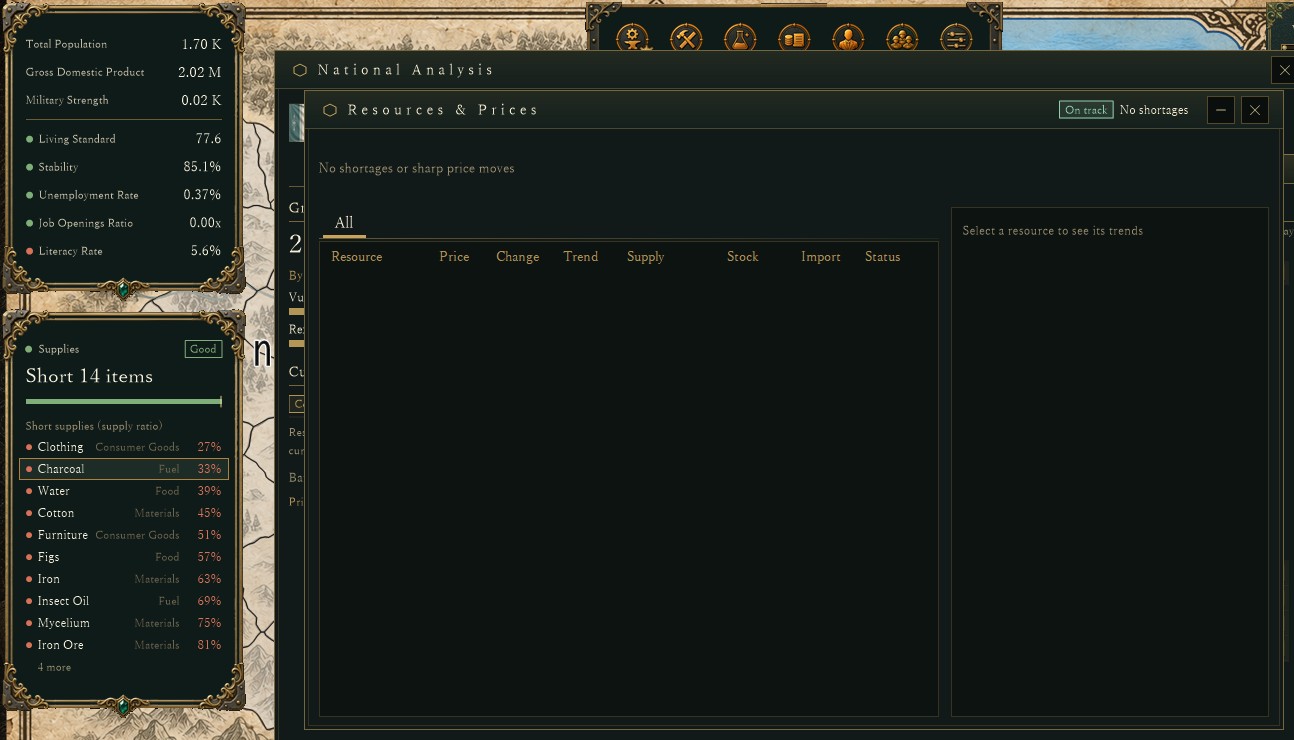
The same build after clicking the Charcoal row. The verification checks that the item clicked matches the item selected in Resources & Prices. This capture uses the sample shortages while the country itself has none, so the Resources & Prices list is empty.
When goods such as tea or tobacco run short, their price, stock and trend are now one click away from the window.
About the imagesAll images were captured from a development debug build drawn off-screen with a verification setup; the title row and parts of the map are cropped out. The short items in the second and third images are a verification sample. The country's state and numbers are still being tuned and may change.
Previous article: DEVELOPMENT PLAN #77 — Commanders Who Reread the Battle: Counterattacks and Pursuit
See the files currently available and the development status on the download page