
DEVELOPMENT SNAPSHOT #90 — Ship of the Line or Corvette? Class Badges for Aircraft
- Monday, November 09 2026
- Contributed by: Takeshi Miyaoka
- Views: 21
When aircraft were listed as equipment, it was hard to tell from the names alone which entries were large airships and which were small transport aircraft. Aircraft now show their class as a badge combining text, a silhouette and a colour. The badges appear in the Production "Add equipment" list and on the equipment rows of the platoon pattern editor. 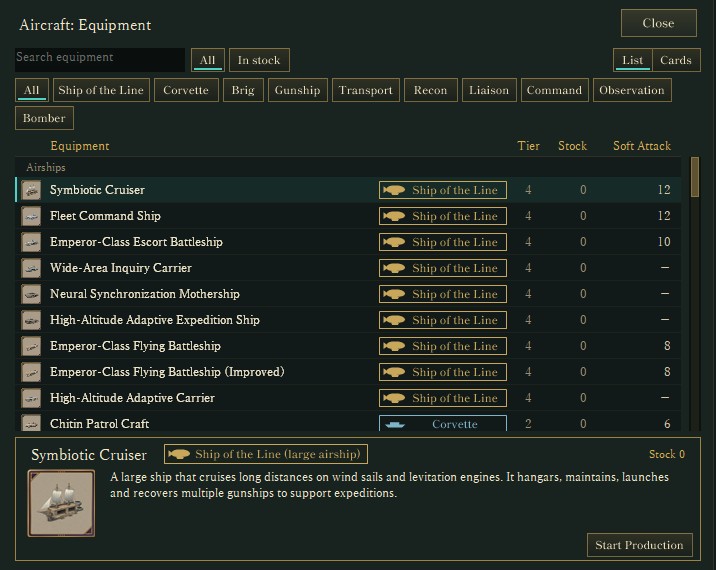
Aircraft in the Production "Add equipment" list (actual Debug-build screen). Each name has a class badge, and the button row above filters by class. The detail panel shows the full class name, such as "Ship of the Line (large airship)".
No new categories: the data's own class is shownThe badge shows the military classification the equipment data already carries (Ship of the Line, Corvette, Brig, Gunship, Transport, Recon, Liaison, Command, Observation, Bomber and so on). Inventing a separate grouping for the screen could make the screen disagree with the data. For example, the Steel-Hull Transport Ship is a Corvette in the data, so it gets a Corvette badge even though its name says "transport".
Shape, silhouette and colourEach badge layers three cues:
- Shape: airships get a square-cornered badge, aircraft a rounded one.
- Silhouette: each class has its own silhouette, sized to suggest the craft's size (Ship of the Line 25×11.5, Corvette 24×11.5, Brig, Gunship and glider types 23×11, Transport 16×13).
- Colour: each class has its own colour (gold for Ship of the Line, light blue for Corvette, green for Brig, and so on).
Badges and silhouette frames have the same width for every class, so text and silhouettes line up when rows are stacked. The shapes and sizes were settled by comparing the badges side by side in a design mock-up first.
Production list: groups, order and filtersChoosing aircraft in Production's "Add equipment" now gives you:
- A class badge in the name column, which is widened to make room; ability columns that no longer fit are dropped (English names are longer, so the English list shows fewer ability columns than the Japanese one).
- "Airships" and "Aircraft" group headings, with rows ordered by class.
- Filter buttons for "All" and each class.
- A badge with the full class name in the detail panel, such as "Ship of the Line (large airship)" or "Corvette (medium airship)".
- In card view, a badge beside the name and a class mark in the top-left corner of the picture.
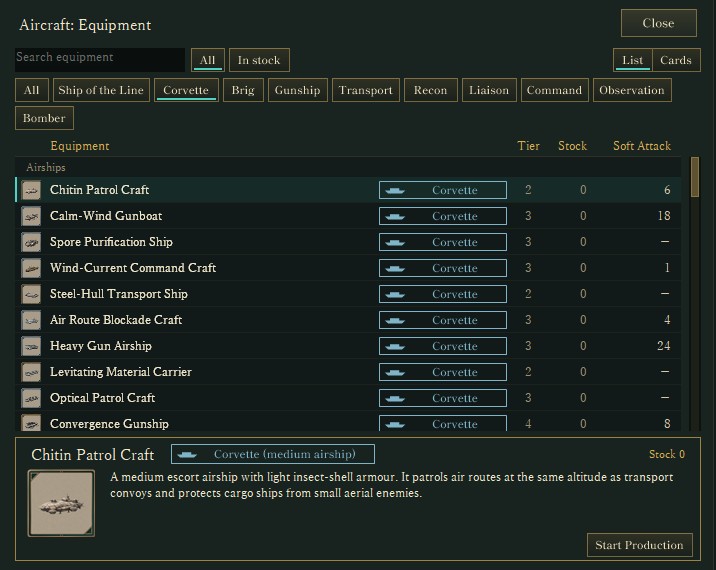
The list filtered to Corvette (actual Debug-build screen). The detail panel reads "Corvette (medium airship)".
Platoon pattern editor: badges on the air squadIn the platoon pattern editor, the same badges appear on the air squad's equipment rows, and equipment cards carry the class mark in the picture's top-left corner. Even a squad that mixes ships of the line, corvettes, brigs, gunships and transports can be read at a glance. The platoon window was also covered in #76. 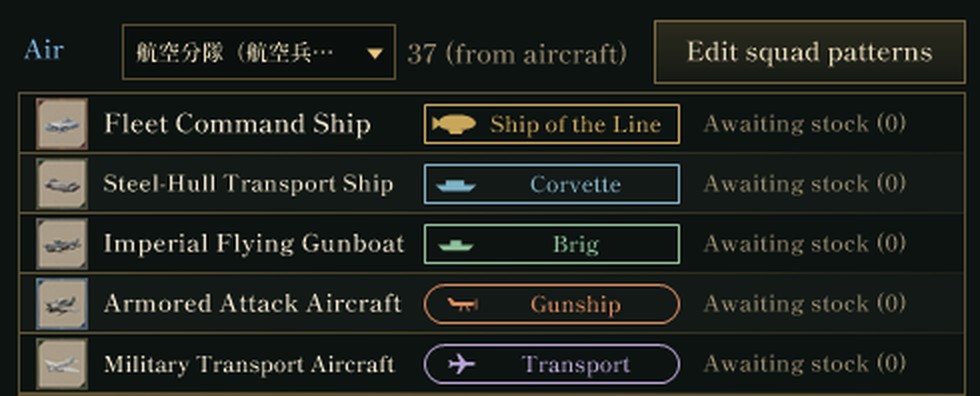
Air squad equipment in the platoon pattern editor (part of an actual Debug-build screen). The top three rows have square-cornered badges (airships); the bottom two have rounded badges (aircraft). The pattern and squad names are capture test data and appear in Japanese.
What was checkedThe actual game screen of the Debug build was captured in both Japanese and English, and the captures were checked for the badges, marks, headings and filters, and for names and filter buttons that are not cut off. The aircraft list has 70 rows; filtered to Corvette it has 14. Non-aircraft lists (such as infantry equipment) were confirmed unchanged. The equipment-selection cards inside the platoon pattern editor were not captured this time (the corner mark was confirmed on the Production cards).
About the imagesAll images are crops of the actual game screen, captured from the updated Debug build launched without showing a window. Equipment values and screen layout may change with future tuning.
Previous article: DEVELOPMENT PLAN #89 — Meeting Raids from the Ground: Linking Guns, Spotters and Command
Check the currently released files and development status on the downloads page