
DEVELOPMENT SNAPSHOT #120 — The Tax Simulation Follows the Calendar
- Tuesday, November 24 2026
- Contributed by: Takeshi Miyaoka
- Views: 14
On November 23, the Multi-year Simulation on the Taxes screen in Domestic Affairs was rebuilt. It used to show one forecast line from today for 1, 3 or 5 years, with one balance bar per year. It now follows the calendar: 1 year means January to December of this year, 3 years are split into quarters, and 5 years into first and second halves. Periods before today show the actual finances recorded so far.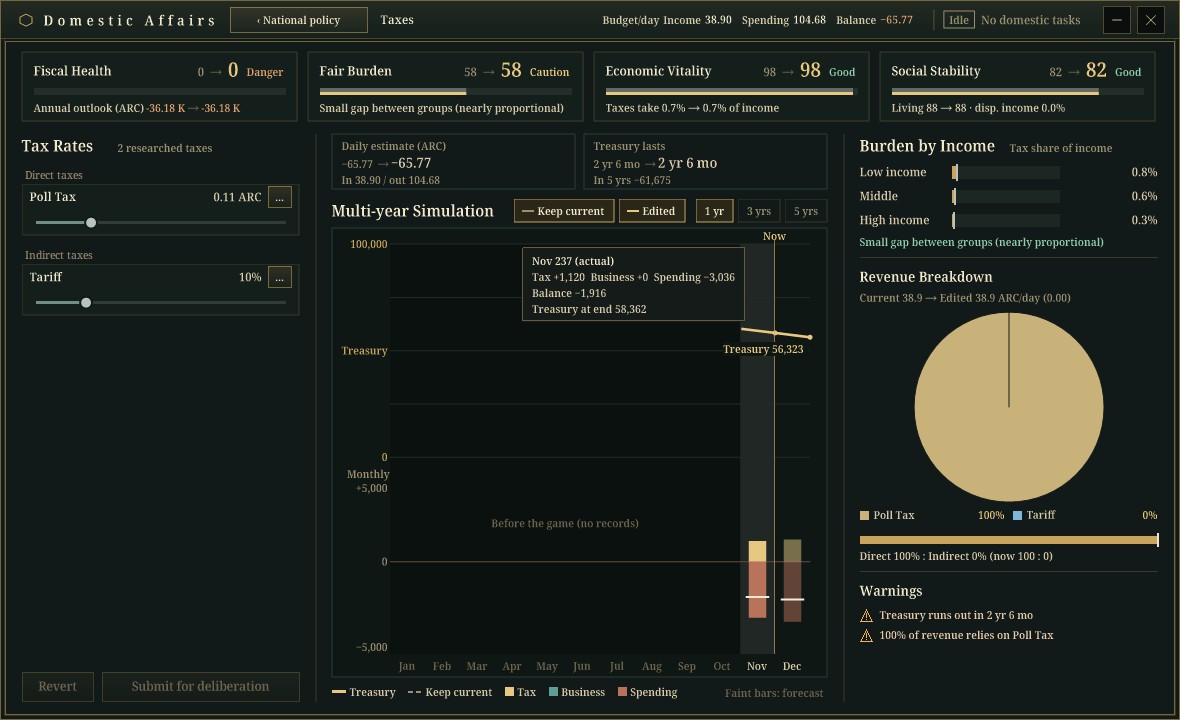
The 1-year view (an actual Debug-build screen). The November bar is actual; the faint December bar is a forecast. The tooltip over November shows tax, business income, spending, the balance and the treasury at the end of the month.
1. Periods follow the calendarThe horizontal axis depends on the length you choose:
- 1 yr: January to December of this year, by month
- 3 yrs: quarters (Q1 to Q4) for three years from this year
- 5 yrs: first halves (H1, January to June) and second halves (H2, July to December) for five years
The "Now" line marks today. Actuals are on its left and forecasts on its right, drawn faintly. Periods before the game started stay empty ("Before the game (no records)").
The upper half is the treasury line and the lower half has one bar per period: tax and business income stacked upward, spending downward. A white tick marks the balance with the edited tax rates and a grey tick the balance if nothing changes. Hovering over a period shows its tax, business income, spending, balance and closing treasury.
2. Change a rate and the lines splitWhen you adjust a rate under Tax Rates, the treasury is drawn twice, "Keep current" as a dashed line and "Edited" as a solid one, and each bar carries both balance ticks.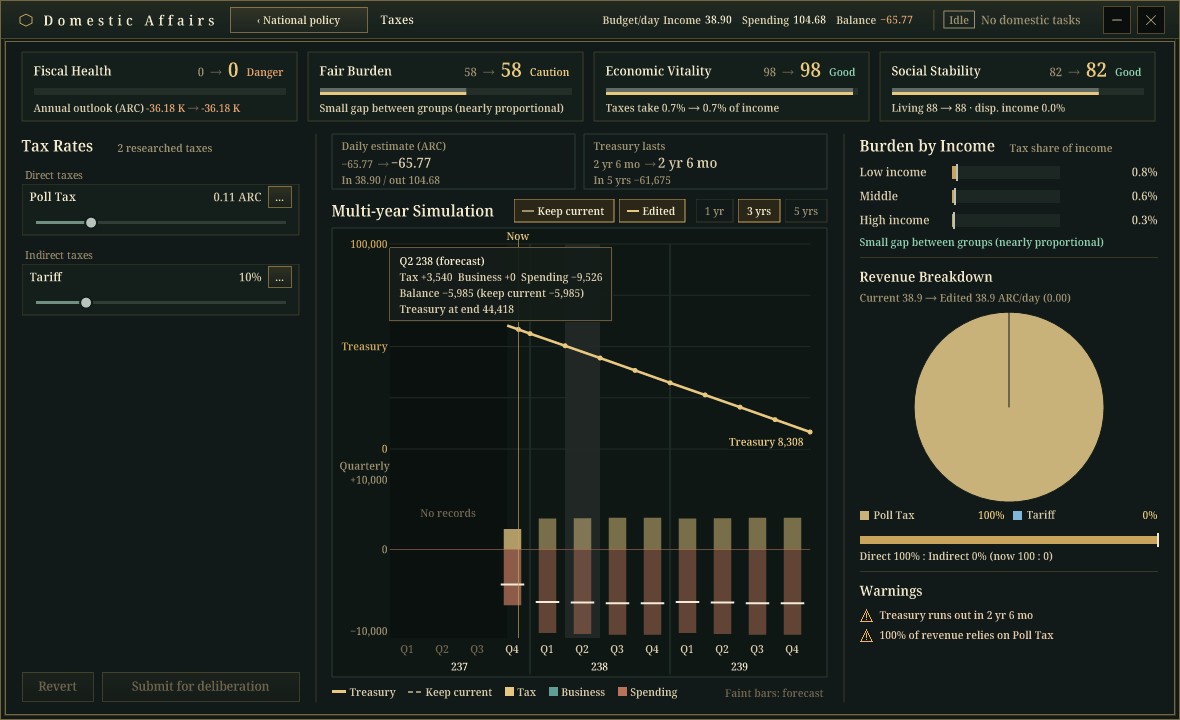
The 3-year view. The tooltip for Q2 238 lists the forecast tax, business income, spending and the treasury at the end of the quarter; the treasury line falls steadily with the current rates.
The forecast counts the rest of this month from today, then whole months. Tax, business income and spending grow or shrink with the population, as in the previous simulation, and tax rates switch at each phase of a change.
3. Actuals come from a monthly finance recordTo draw actual bars, each country now keeps a monthly finance record. At midnight every day, the previous days' tax, business income and spending are added to their month, based on the daily treasury balance and the tax settlement records. Spending is tax plus business income minus the change in the treasury, so it includes other flows. There is one entry per month, and only the latest 24 months are kept (the chart reads from January of this year, so last year must still be there).
Right after a new game starts there is no daily treasury record yet. In that case November is rebuilt from the tax settlements left by the 30 days of economy run at the start and the budget's expected spending (a follow-up fix the same day). The November bar in the first picture is such a rebuilt actual.
In the 5-year view, a dotted vertical line marks when the treasury is expected to run out ("Treasury empty 2 yr 6 mo").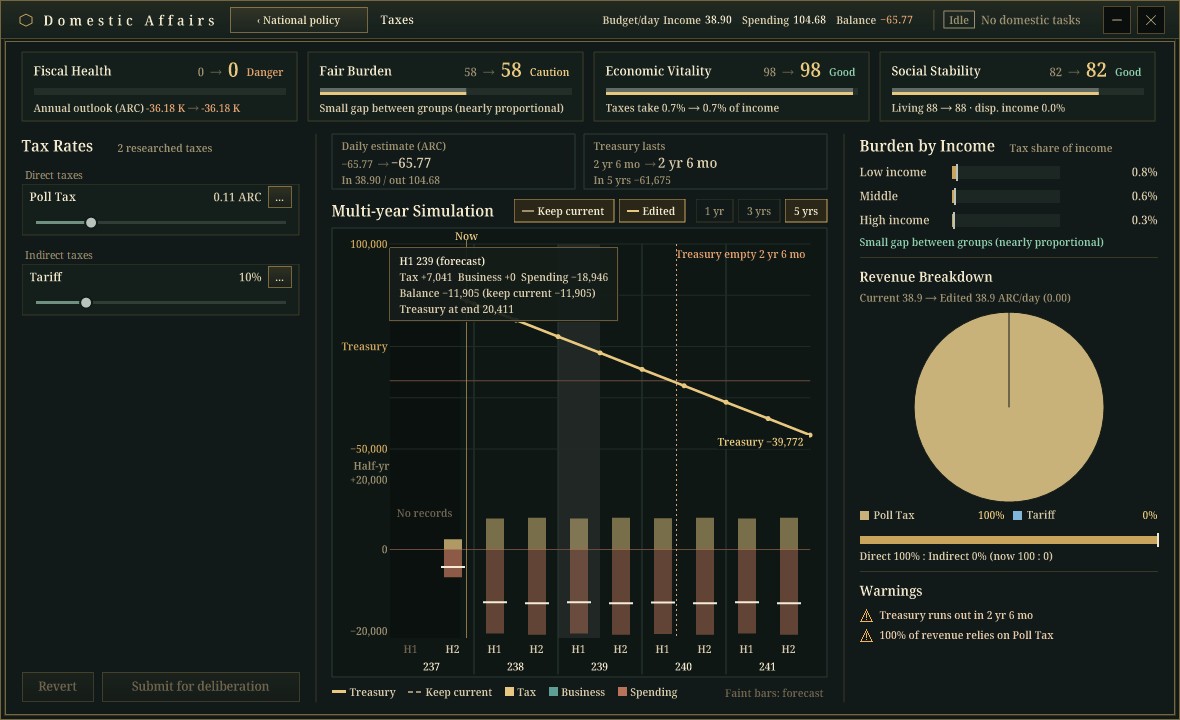
The 5-year view. H2 237 combines actual and forecast; later periods are forecasts. With the current rates, the treasury is expected to run out around the middle of 240.
What was checkedNew tests cover how the monthly record is built (days with and without a treasury record, and the 24-month retention). For the screen, a Debug build made from main after the merge was started off-screen, and the 1-, 3- and 5-year views, plus 1- and 3-year views with an edited rate, were captured in Japanese and English with the automated checks passing. Around the merge, the treasury label at the right end was moved below its dot and the lower-half heading was fitted inside the frame.
Not done yet- The change is awaiting the user's review, so the layout and periods may still change.
- Actual business income is the state business income estimate (the same calculation as the budget) added day by day.
The images are actual game screens from a Debug build made from main on November 23 and started without showing a window. They use a verification state started from the initial master (the Valza Empire, December 1, 237), not a user's save. The Japanese article uses the Japanese screen and this article the English one. Amounts belong to that verification state.
See the files currently available and the development status on the download page