
DEVELOPMENT SNAPSHOT #82 — Donuts on Both Sides: Rebuilding the Map HUD
- Thursday, November 05 2026
- Contributed by: Takeshi Miyaoka
- Views: 10
We spent a day rebuilding the HUD, the information windows that always sit on the left and right of the map. The left window now gathers finances and supplies, showing revenue, expenditure and supply shortages with matching donut charts. The calendar window on the right now holds the national analysis and the domestic policy choice that used to live in Domestic Affairs. Without opening a single window, the treasury, the missing goods and the national course are always in view beside the map. 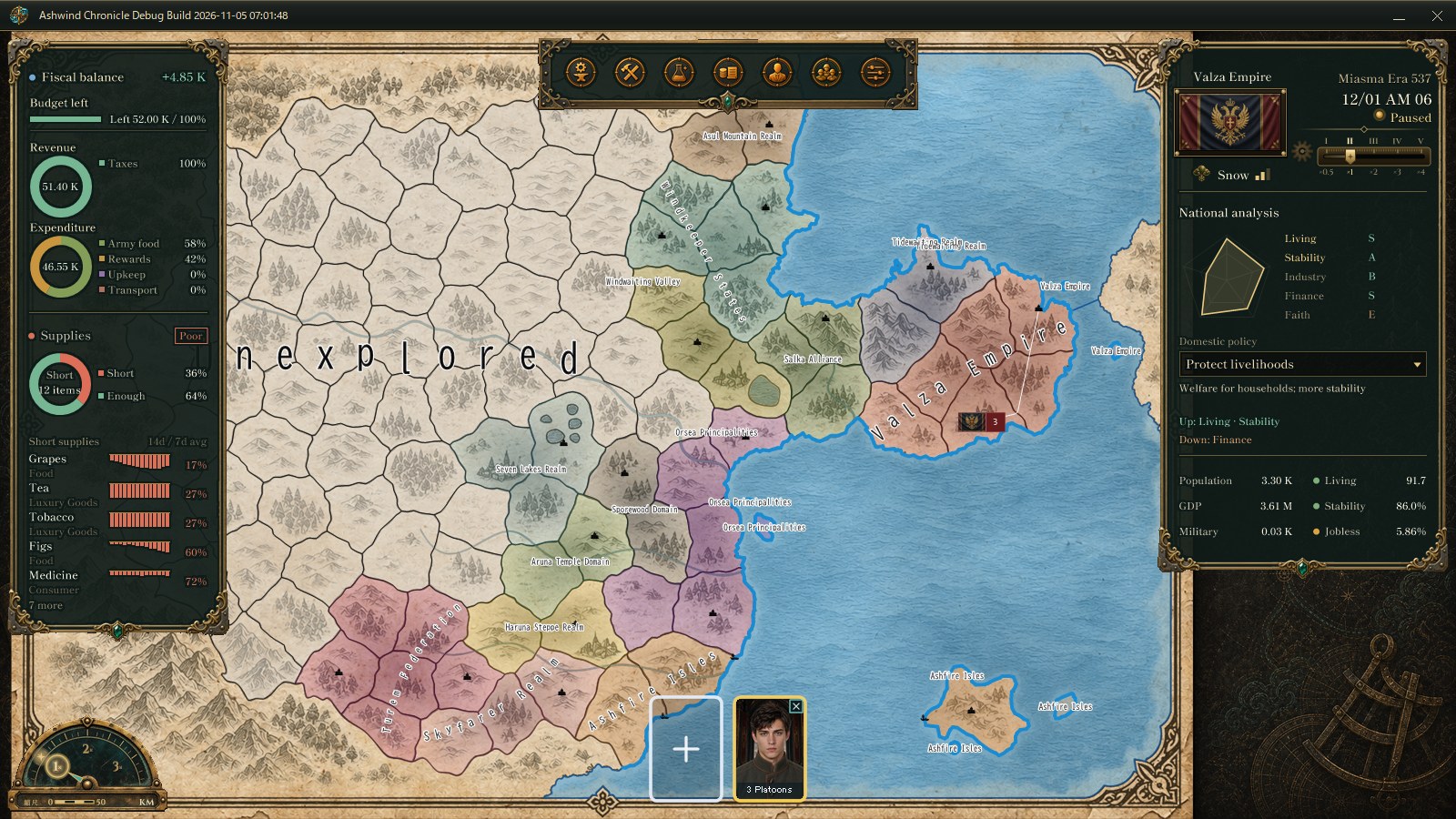
The game screen captured for verification in a development debug build (the Valza Empire on the first day of a new game). Left: the fiscal balance and supplies window. Top right: the calendar and national analysis. Numbers come from a verification setup and may change.
Left window: fiscal balance and revenue/expenditure donutsThe national budget window that sat below the calendar is now the top half of the left window. The first line is "Fiscal balance", showing the projected annual balance in large type; the dot in front turns blue for a surplus and red for a deficit. Hovering the line outlines it like the country overview rows, and clicking it opens national budget planning (replacing the old "Open budget planning" button). The remaining annual budget (amount and share) sits right below it, and the treasury cash line was removed.
Below that, revenue and expenditure appear as two stacked donut charts, with the total in the middle of each ring and the breakdown and shares on the right.
- Revenue: taxes and business.
- Expenditure: the three largest items by amount, plus "Other" for the rest. With four items or fewer, all are listed as they are.
Before, income and spending were two bands on the same scale with a colored list of expenses: the balance was clear, but not what the income relied on or which costs were largest. With the donuts, the country in the picture reads at a glance: "almost 60% of spending is army food, the rest is rewards". The columns were also adjusted so English percentages are never cut off. 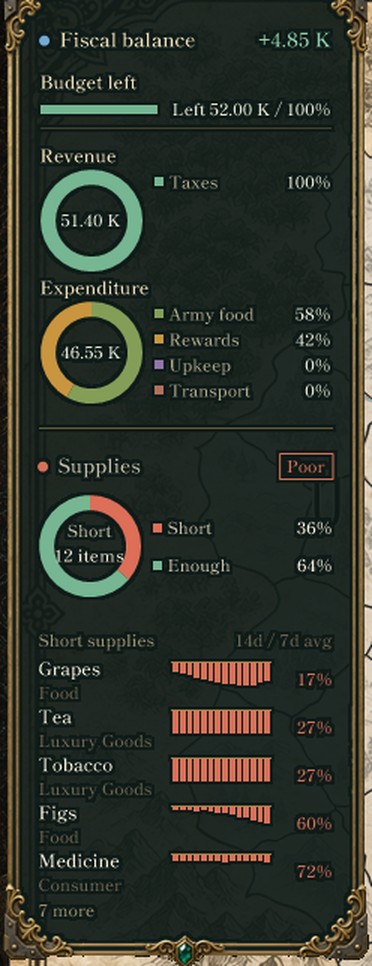
The left window from the same capture, enlarged. From the top: fiscal balance (+4.85 K), budget left, revenue (51.40 K, 100% taxes), expenditure (46.55 K: army food 58%, rewards 42% and so on), supplies (12 items short, 36%) and the five worst short supplies.
Supplies: the shortage share as a donut, 14 days of history per itemThe supplies window we separated from the country overview (#78) moved into the lower half of the same left window as the finances, with its heading matched to the fiscal balance.
- The bar that showed the share of items in supply became a donut: "Short / N items" in the middle, and the "Short" and "Enough" shares on the right. The ring has the same size and thickness as the revenue and expenditure donuts.
- The short supplies list was compacted to the five items with the lowest supply ratio plus one "N more" line (previously up to ten).
- Each item row shows the last 14 days of its supply ratio (each day a 7-day average) as small bars. The top line means "no shortage", and each bar hangs down by the share that went unmet, so a longer bar means a worse shortage. The item's category (food, luxury goods, consumer goods and so on) appears under its name.
Two items both at 27% can now be told apart: one that has been short all along, and one that only just started running out.
Right window: national analysis and domestic policy under the calendarBelow the weather and game speed, the calendar window now carries the "National analysis": Living, Stability, Industry, Finance and Faith as a pentagon chart with grades, and below it the domestic policy choice. Changing the policy immediately updates its description and the items it raises and lowers. Until now you had to open Domestic Affairs to choose it. 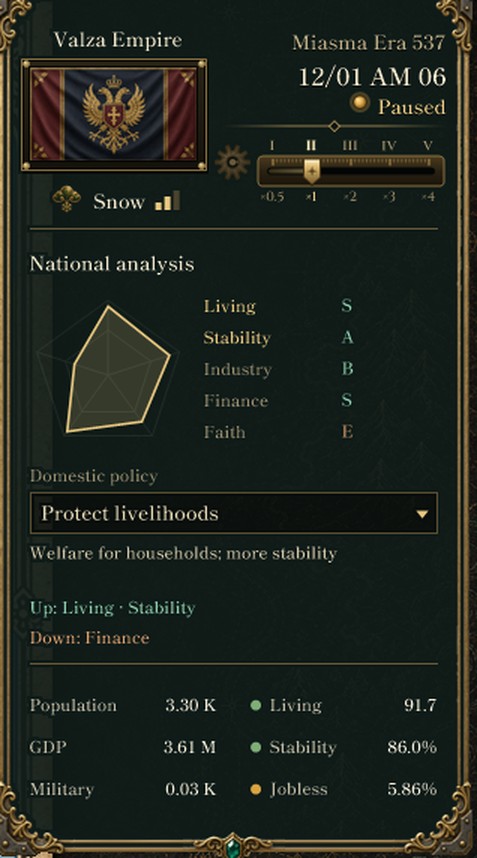
The right window from the same capture: the five analysis items, the "Protect livelihoods" policy with what it raises and lowers, and two columns of national scale and state below.
The country overview below is now two columns: national scale on the left (population, GDP, military) and national state on the right (living standard, stability, unemployment). With supplies moved to the left window, the overview became part of the calendar window on the right.
What changedThe map's left side is now "money and goods", and its right side "time, national course and state". Following #80, which narrowed the first Domestic Affairs screen to the minister's proposals, the policy choice itself can now be made right from the map.
About the imagesAll images are the game screen, and enlarged parts of it, captured from a development debug build drawn off-screen with a verification setup. They show the first day of a new game; the country's state and numbers are still being tuned and may change.
Previous article: DEVELOPMENT PLAN #81 — A Purse for Welfare: A Social Security Tax on Wages
See the files currently available and the development status on the download page